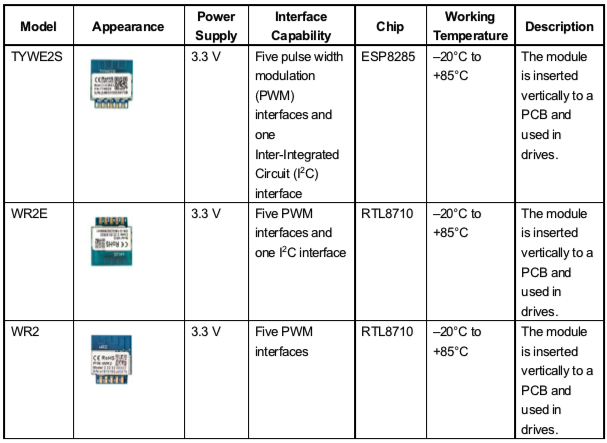
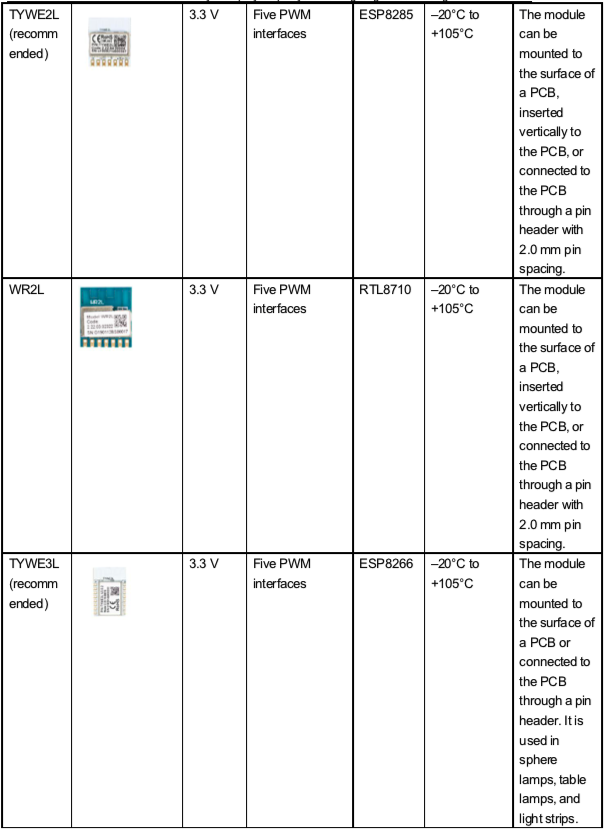
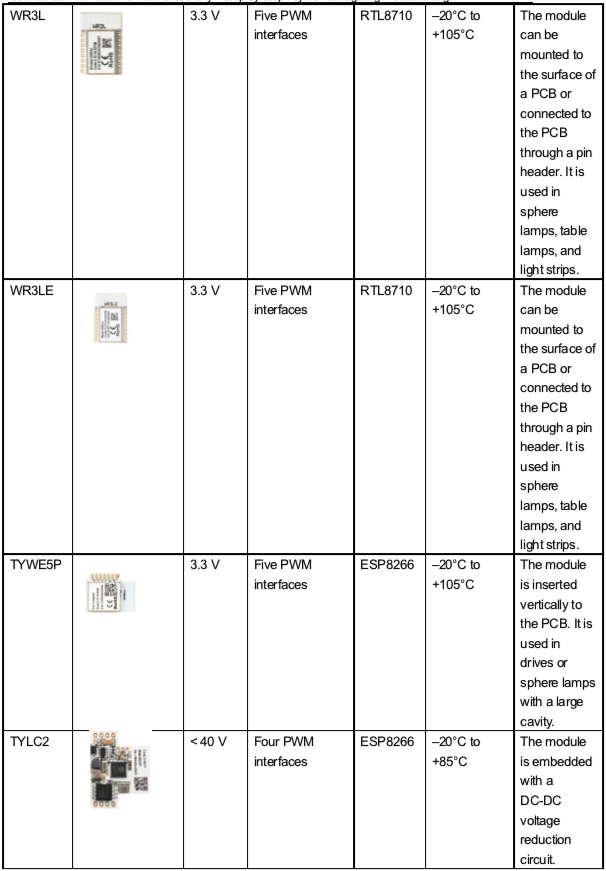
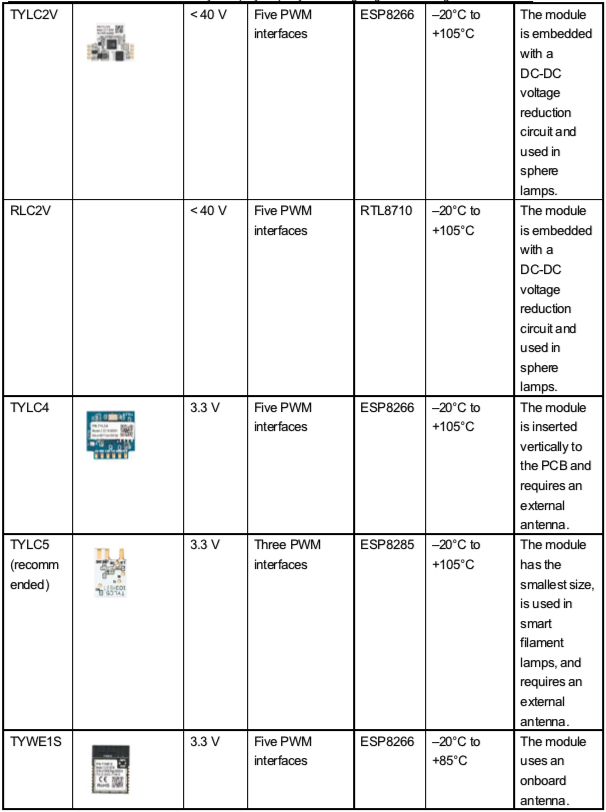
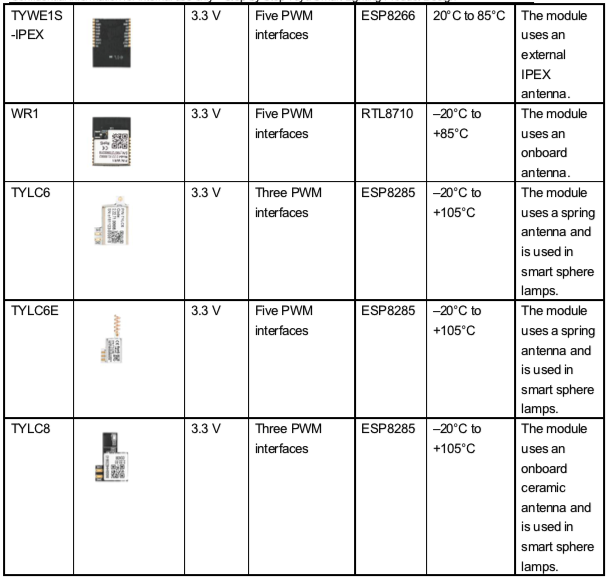
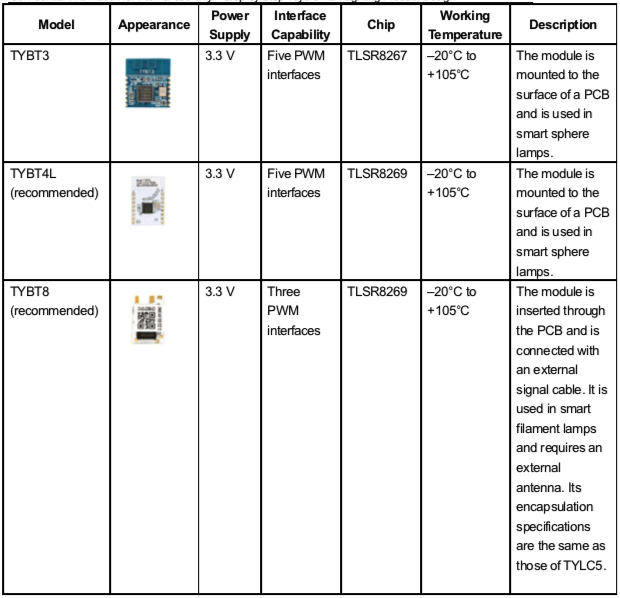
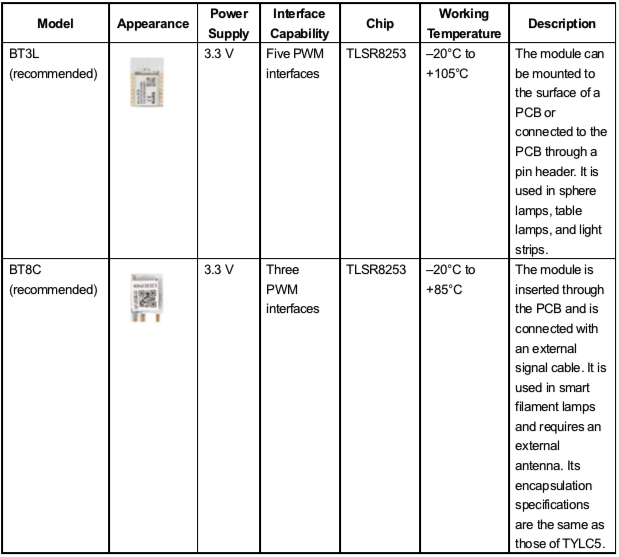
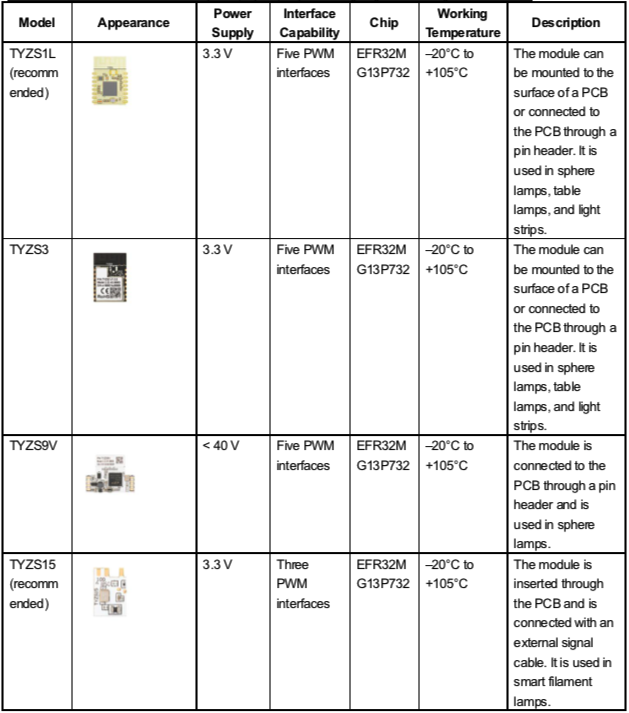
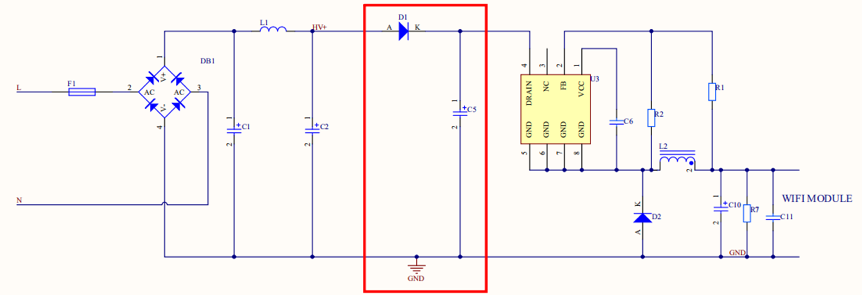
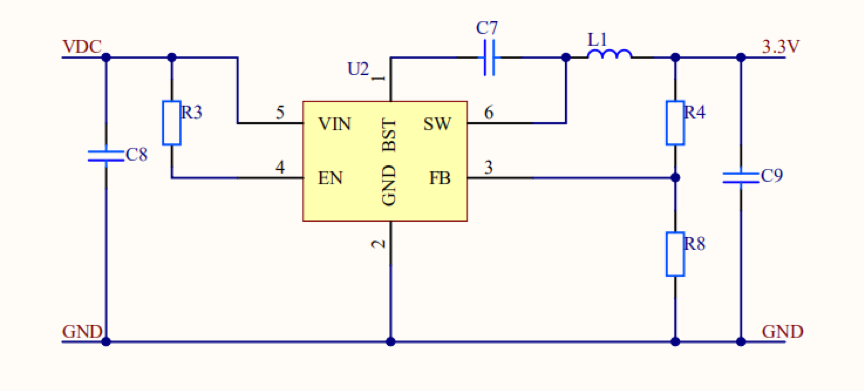
 * Low dropout (LDO) regulators are not recommended for powering Wi-Fi modules. If an LDO regulator is used, use a chip with 500 mA or higher power supply current and ensure good heat dissipation. When the input voltage is higher than 5 V, a switch-type power chip is recommended.
Similar to light, wireless signals may be blocked by metal in the transmission path. If an antenna is mounted on a metal surface, the module cannot work properly.
To use a module in a sphere lamp, ensure that the module's antenna is out of the opening groove of the alumina substrate and that the onboard antenna is higher than the alumina substrate. When the light source is not affected and there are no shadows, position the antenna out of the lamp cup's shielding environment as much as possible.
When using a module in a lamp with a metal cover, for example, a downlight or spotlight lamp or lamp used outdoors, consider the antenna RF design and use an external antenna if needed. To use a module in a drive, keep the module away from components such as the transformer and inductor.
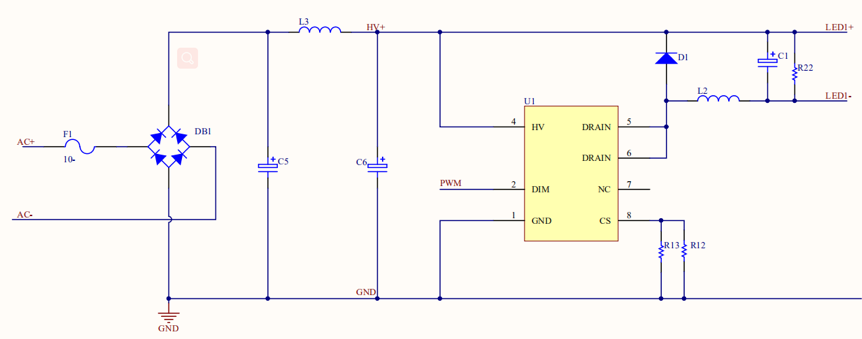
Advantages: high efficiency, high power factor (PF), good constant-current characteristics, high linearity, and adjustable, wide output voltage range
Disadvantages: strong electromagnetic interference (EMI), high cost, noise during PWM light adjustment, and complex PCB layout
The module generates PWM signals.
 * Linear AC-DC constant-current driver
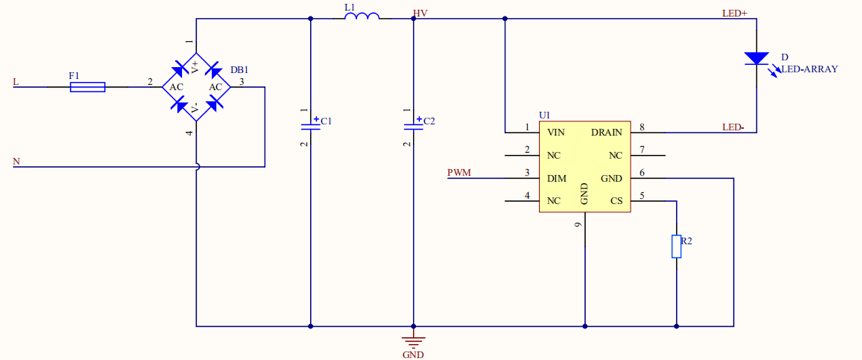
Advantages: low cost, no EMI issue, simple PCB layout, and no noise during PWM light adjustment
Disadvantages: low efficiency, narrow voltage range, poor constant-current characteristics, poor linearity, fixed output voltage, and low PF
The module generates PWM signals.
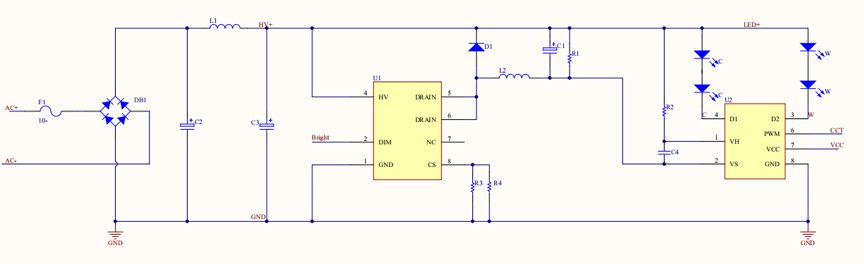
The solution has the CW and CCT control modes. The CW mode uses 2-channel PWM signals for simultaneous control of the brightness and color temperature. The 2-channel PWM signals are CW and WW signals, which respectively control the white light with a high color temperature and warm light with a low color temperature. During 1-channel light adjustment, CW signals are used. The CCT mode uses 2-channel PWM signals for separate control of the brightness and color temperature. The Bright signals control the brightness, and the CCT signals control the color temperature. For details, see the pin configuration.
Advantages: high efficiency, good constant-current characteristics, high linearity, and good light adjustment
Disadvantages: strong EMI, circuit noise, large color temperature offset when the duty cycle is small, complex circuit layout, and high cost
The module generates 2-channel PWM signals: CW and WW.
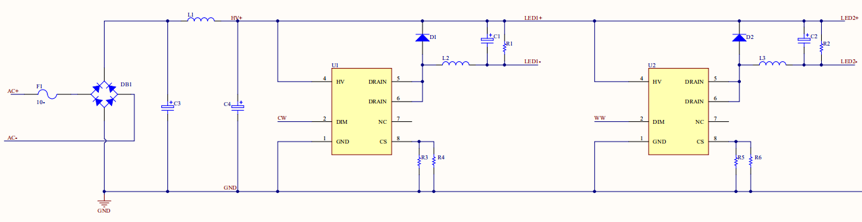 * Linear AC-DC constant-current driver in CW mode
Advantages: low cost, no EMI issue, simple PCB layout, and no noise during PWM light adjustment
Disadvantages: low efficiency, narrow voltage range, poor constant-current characteristics, poor linearity, fixed output voltage, and large color temperature offset when the duty cycle is small
The module generates 2-channel PWM signals: CW and WW.
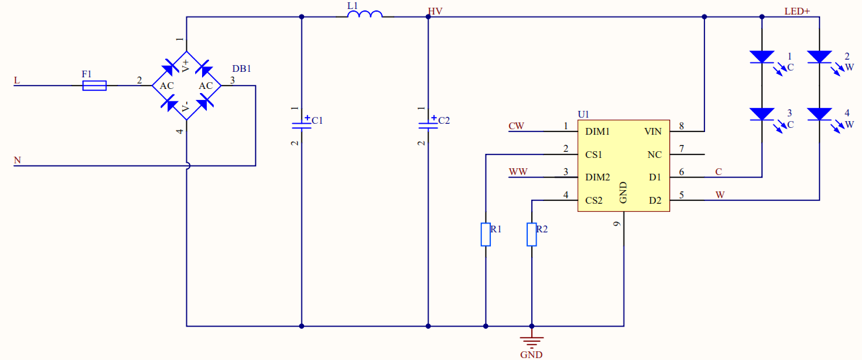
Advantages: high efficiency, good constant-current characteristics, high linearity, basically no color temperature offset, good light adjustment, simulated brightness control, low cost, simple circuit layout, and no noise
Disadvantages: strong EMI and higher cost than the linear AC-DC constant-current driver in CW mode
The module generates 2-channel PWM signals: Bright and CCT.
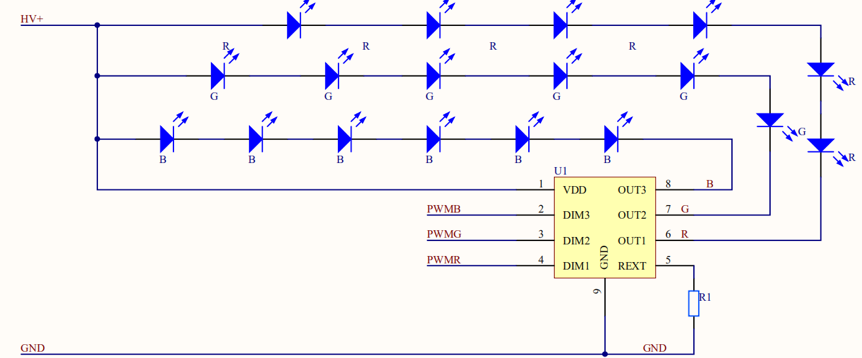
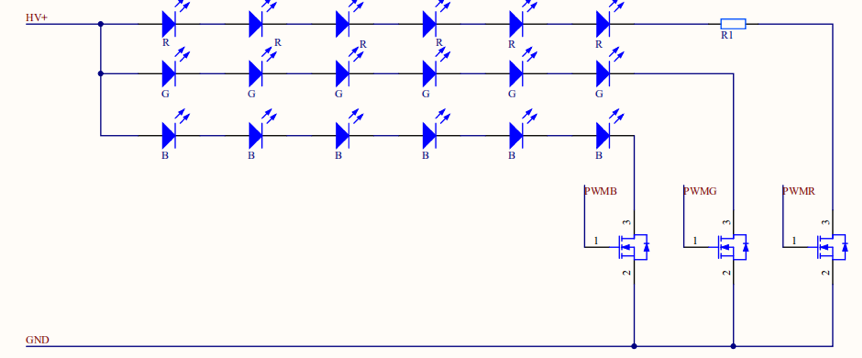
The module generates 3-channel PWM signals: PWMR, PWMG, and PWMB. The linear constant-current driver ensures constant RGB current output.
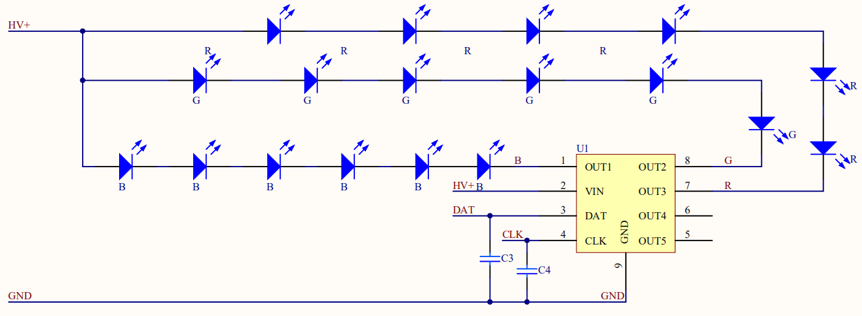
The I2C DAT and CLK signals can control RGB or RGBCW lamps, requiring only several control pins. The module generates I2C DAT and CLK signals to the drive chip to ensure constant RGB current. To use the I2C solution, pay attention to the PCB layout. I2C signals are vulnerable to interference from switch signals (AC-DC drive circuit). If the interference is serious, add a 10 pF to 50 pF filter capacitor to the DAT and CLK signal circuits during PCB layout design to reduce interference.
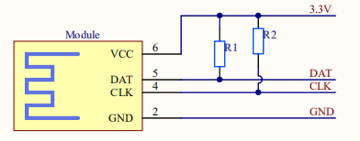
Note: Pull-up resistors need to be added to the physical circuits of the peripheral I2C DAT and CLK signals. Typically, the resistance value is 4.7 kiloohms, which can be adjusted based on the actual scenario.
Use the BJT or MOSFET switch to control RGB through PWM signals. The RGB current is variable and discrete. Add a resistor for the red light control channel to limit the current because the red light diode has a low voltage. In this case, under the same input conditions as the constant-current solution, the loss is increased. Note: The bead voltage cannot be greatly different from the input voltage.
Advantages: simple solution, simple peripheral parameters, low cost, and requires only the DAT and CLK signals for control
Disadvantages: driven by linear constant current, and DAT and CLK signals are vulnerable to interference
Note: The RGB light needs to be powered separately. An AC-DC + DC-DC power supply solution is recommended.
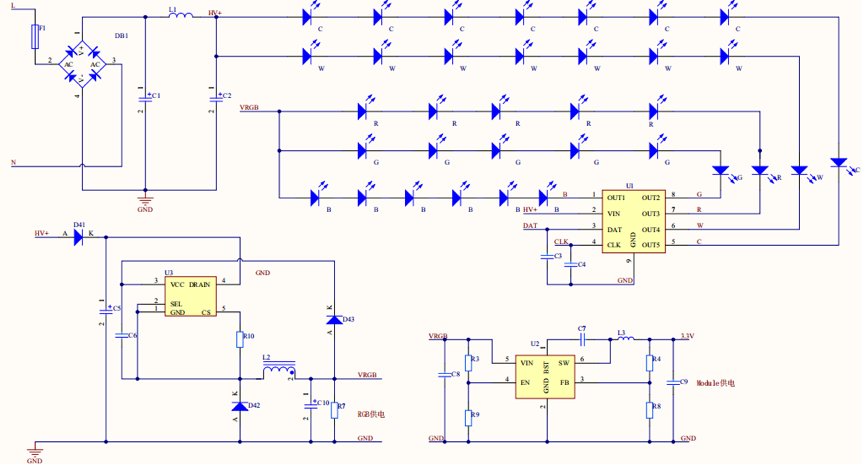
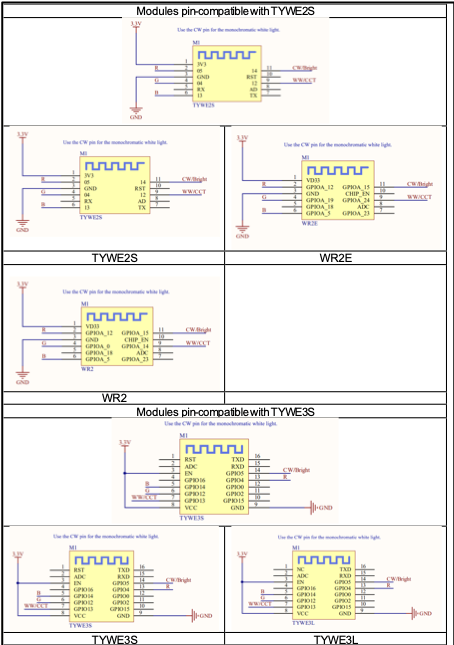
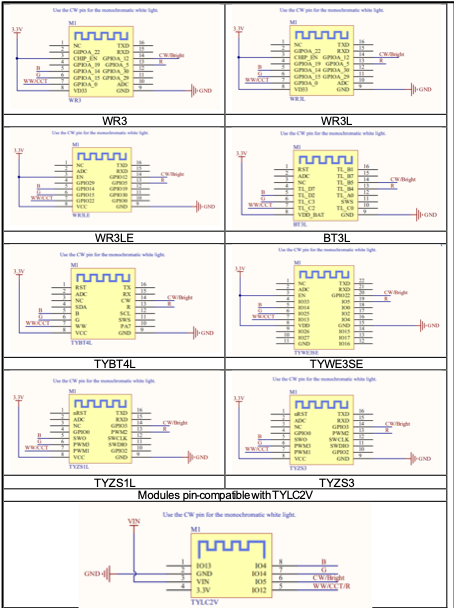
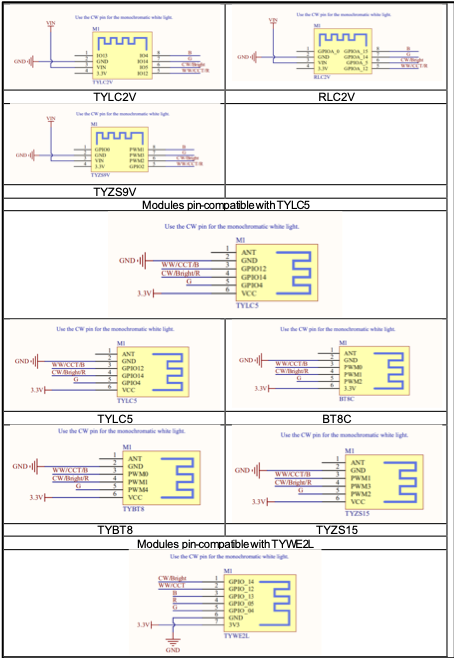
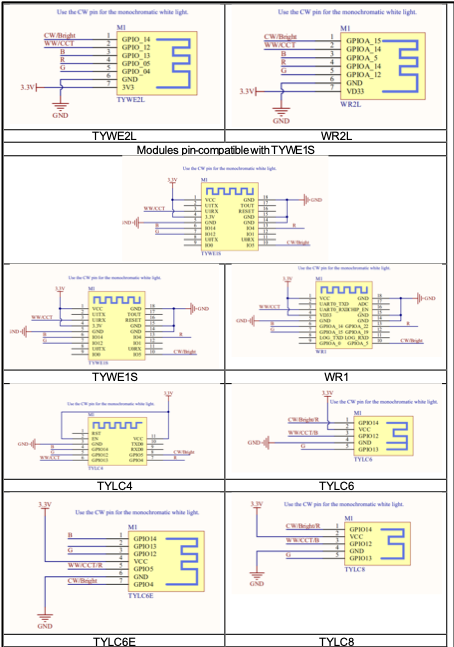
In network configuration mode, the CW pin generates a high or low level to indicate the network configuration status. The CW pin is used for 1-channel light control. For cold and warm light control in CW mode, the CW and WW pins control the cold and warm light, respectively. In CCT control mode, the Bright and CCT pins respectively control the brightness and color temperature.
The following tables define the module pins.
TYWE3S TYWE3L TYWE5P
| I/O Interface | W | CW | CCT | RGB(PWM) | RGB (I2C) |
|---|---|---|---|---|---|
| IO5 | W | CW | Bright | ||
| IO13 | WW | CCT | |||
| IO4 | R | SCL | |||
| IO12 | G | ||||
| IO14 | B | SDA | |||
| IO16 | Low-power | ||||
TYWE3SE
| I/O Interface | W | CW | CCT | RGB(PWM) | RGB (I2C) |
|---|---|---|---|---|---|
| IO22 | W | CW | Bright | ||
| IO13 | WW | CCT | |||
| IO5 | R | SCL | |||
| IO25 | G | ||||
| IO14 | B | SDA | |||
| IO33 | Low-power | ||||
TYWE1S TYLC4
| I/O Interface | W | CW | CCT | RGB(PWM) | RGB (I2C) |
|---|---|---|---|---|---|
| IO5 | W | CW | Bright | ||
| IO13 | WW | CCT | |||
| IO4 | R | SCL | |||
| IO12 | G | Low-power | |||
| IO14 | B | SDA | |||
TYWE2S TYWE2L
| I/O Interface | W | CW | CCT | RGB(PWM) | RGB (I2C) |
|---|---|---|---|---|---|
| IO14 | W | CW | Bright | ||
| IO12 | WW | CCT | |||
| IO5 | R | SCL | |||
| IO4 | G | Low-power | |||
| IO13 | B | SDA | |||
TYLC5
| I/O Interface | W | CW | CCT | RGB(PWM) | RGB (I2C) |
|---|---|---|---|---|---|
| IO14 | W | CW | Bright | R | SCL |
| IO12 | WW | CCT | B | SDA | |
| IO4 | G | Low-power | |||
TYLC6 TYLC8
| I/O Interface | W | CW | CCT | RGB(PWM) | RGB (I2C) |
|---|---|---|---|---|---|
| IO14 | W | CW | Bright | R | SCL |
| IO12 | WW | CCT | B | SDA | |
| IO13 | G | Low-power | |||
TYLC6E
| I/O Interface | W | CW | CCT | RGB(PWM) | RGB (I2C) |
|---|---|---|---|---|---|
| IO4 | W | CW | Bright | ||
| IO5 | WW | CCT | R | ||
| IO12 | G | SDA | |||
| IO14 | B | SCL | |||
| IO13 | Low-power | ||||
TYLC2V
| I/O Interface | W | CW | CCT | RGB(PWM) | RGB (I2C) |
|---|---|---|---|---|---|
| IO5 | W | CW | Bright | ||
| IO12 | WW | CCT | R | ||
| IO14 | G | SDA | |||
| IO4 | B | SCL | |||
| IO13 | Low-power | ||||
WR1 (Pin-compatible with TYWE1S)
| I/O Interface | W | CW | CCT | RGB(PWM) | RGB (I2C) |
|---|---|---|---|---|---|
| GPIOA_5 | W | CW | Bright | ||
| GPIOA_18 | WW | CCT | |||
| GPIOA_22 | R | SCL | |||
| GPIOA_15 | G | Low-power | |||
| GPIOA_14 | B | SDA | |||
WR3 and WR3L (Pin-compatible with TYWE3S and TYWE3L)
| I/O Interface | W | CW | CCT | RGB(PWM) | RGB (I2C) |
|---|---|---|---|---|---|
| GPIOA_12 | W | CW | Bright | ||
| GPIOA_0 | WW | CCT | |||
| GPIOA_5 | R | SCL | |||
| GPIOA_15 | G | ||||
| GPIOA_14 | B | SDA | |||
| GPIOA_19 | Low-power | ||||
WR3E and WR3LE (Pin-compatible with TYWE3S and TYWE3L)
| I/O Interface | W | CW | CCT | RGB(PWM) | RGB (I2C) |
|---|---|---|---|---|---|
| GPIOA_12 | W | CW | Bright | ||
| GPIOA_22 | WW | CCT | |||
| GPIOA_5 | R | SCL | |||
| GPIOA_15 | G | ||||
| GPIOA_14 | B | SDA | |||
| GPIOA_29 | Low-power | ||||
WR5P (Pin-compatible with TYWE5P)
| I/O Interface | W | CW | CCT | RGB(PWM) | RGB (I2C) |
|---|---|---|---|---|---|
| GPIOA_12 | W | CW | Bright | ||
| GPIOA_5 | WW | CCT | |||
| GPIOA_14 | R | SCL | |||
| GPIOA_15 | G | ||||
| GPIOA_0 | B | SDA | |||
| GPIOA_22 | Low-power | ||||
RLC2V and RLC7V (Pin-compatible with TYLC2V)
| I/O Interface | W | CW | CCT | RGB(PWM) | RGB (I2C) |
|---|---|---|---|---|---|
| GPIOA_5 | W | CW | Bright | ||
| GPIOA_12 | WW | CCT | R | ||
| GPIOA_14 | G | SDA | |||
| GPIOA_15 | B | SCL | |||
| GPIOA_0 | Low-power | ||||
RLC4 (Pin-compatible with TYLC4)
| I/O Interface | W | CW | CCT | RGB(PWM) | RGB (I2C) |
|---|---|---|---|---|---|
| GPIOA_5 | W | CW | Bright | ||
| GPIOA_12 | WW | CCT | |||
| GPIOA_19 | R | SCL | |||
| GPIOA_15 | G | Low-power | |||
| GPIOA_14 | B | SDA | |||
WR2L (Pin-compatible with TYWE2L)
| I/O Interface | W | CW | CCT | RGB(PWM) | RGB (I2C) |
|---|---|---|---|---|---|
| GPIOA_15 | W | CW | Bright | ||
| GPIOA_14 | WW | CCT | |||
| GPIOA_19 | R | SCL | |||
| GPIOA_12 | G | Low-power | |||
| GPIOA_5 | B | SDA | |||
WR2E (Pin-compatible with TYWE2S)
| I/O Interface | W | CW | CCT | RGB(PWM) | RGB (I2C) |
|---|---|---|---|---|---|
| GPIOA_15 | W | CW | Bright | ||
| GPIOA_24 | WW | CCT | |||
| GPIOA_12 | R | SCL | |||
| GPIOA_19 | G | Low-power | |||
| GPIOA_5 | B | SDA | |||
WR2 (Pin-compatible with TYWE2S)
| I/O Interface | W | CW | CCT | RGB(PWM) | RGB (I2C) |
|---|---|---|---|---|---|
| GPIOA_15 | W | CW | Bright | ||
| GPIOA_14 | WW | CCT | |||
| GPIOA_12 | R | SCL | |||
| GPIOA_0 | G | Low-power | |||
| GPIOA_5 | B | SDA | |||
TYBY3
| I/O Interface | W | CW | CCT | RGB(PWM) | RGB (I2C) |
|---|---|---|---|---|---|
| GPIOA_15 | W | CW | Bright | ||
| GPIOA_14 | WW | CCT | |||
| GPIOA_12 | R | SCL | |||
| GPIOA_0 | G | Low-power | |||
| GPIOA_5 | B | SDA | |||
TYBT4L (Pin-compatible with TYWE3S)
| I/O Interface | W | CW | CCT | RGB(PWM) | RGB (I2C) |
|---|---|---|---|---|---|
| GPIOA_15 | W | CW | Bright | ||
| GPIOA_14 | WW | CCT | |||
| GPIOA_12 | R | SCL | |||
| GPIOA_0 | G | ||||
| GPIOA_5 | B | SDA | |||
| GPIOA_5 | Low-power | ||||
TYBT8 (Pin-compatible with TYLC5)
| I/O Interface | W | CW | CCT | RGB(PWM) | RGB (I2C) |
|---|---|---|---|---|---|
| PWM1 | W | CW | Bright | R | SCL |
| PWM0 | WW | CCT | B | SDA | |
| PWM4 | G | Low-power | |||
BT3L (Pin-compatible with TYWE3S)
| I/O Interface | W | CW | CCT | RGB(PWM) | RGB (I2C) |
|---|---|---|---|---|---|
| TL_B5 | W | CW | Bright | ||
| TL_C2 | WW | CCT | |||
| TL_B4 | R | SCL | |||
| TL_C3 | G | ||||
| TL_D2 | B | SDA | |||
| TL-D7 | Low-power | ||||
BT8C (Pin-compatible with TYLC5 and TYBT8)
| I/O Interface | W | CW | CCT | RGB(PWM) | RGB (I2C) |
|---|---|---|---|---|---|
| PWM1 | W | CW | Bright | R | SCL |
| PWM0 | WW | CCT | B | SDA | |
| PWM4 | G | Low-power | |||
TYZS3 and TYZS1L (Pin-compatible with TYWE3S)
| I/O Interface | W | CW | CCT | RGB(PWM) | RGB (I2C) |
|---|---|---|---|---|---|
| GPIO3 | W | CW | Bright | ||
| PWM1 | WW | CCT | |||
| PWM2 | R | SCL | |||
| PWM3 | G | ||||
| SWO | B | SDA | |||
| GPIO0 | Low-power | ||||
TYZS15 (Pin-compatible with TYLC5, TYBT8, and BT8C)
| I/O Interface | W | CW | CCT | RGB(PWM) | RGB (I2C) |
|---|---|---|---|---|---|
| PWM3 | W | CW | Bright | R | SCL |
| PWM1 | WW | CCT | B | SDA | |
| PWM2 | G | Low-power | |||
TYZS9V (Pin-compatible with TYLC2V)
| I/O Interface | W | CW | CCT | RGB(PWM) | RGB (I2C) |
|---|---|---|---|---|---|
| PWM2 | W | CW | Bright | ||
| GPIO2 | WW | CCT | R | ||
| PWM3 | G | SDA | |||
| PWM1 | B | SCL | |||
| GPIO0 | Low-power | ||||
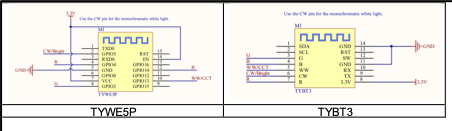
The following figures show pins on some modules:
When the Espressif Systems 8266 chip is being powered on, some I/O interfaces are unstable and have weak output with a high pulse for 180 ms during initialization. As a result, the high level-driven light blinks. To prevent this scenario, connect pull-down resistors whose resistance is less than or equal to 3.3 kiloohms to these I/O interfaces. A lower resistance may be required according to the peripheral circuit. For details, see the following initial pin status table.
Initial pin status:
| Pin | Initial Status | Recommended Configuration |
|---|---|---|
| IO2 | Pulled up | Add an external pull-down resistor. |
| IO4 | High resistance | Add an external pull-down resistor. |
| IO5 | High resistance | Add an external pull-down resistor. |
| IO12 | Pulled up | Add an external pull-down resistor. |
| IO13 | Pulled up | Add an external pull-down resistor. |
| IO14 | Pulled up | Add an external pull-down resistor. |
| IO15 | Low-level | |
| IO16 | High-level |