This topic describes the latest APIs of the Cloud Development platform. If you are using the previous version, see Open API.
| name | type | description |
|---|---|---|
| client_id | String | client_id,get from iot.tuya.com,equals accessId |
| secret | String | secret,get from iot.tuya.com,equals accessKey |
| t | Long | 13-digit standard time stamp |
| sign | String | The signature result field, according to the result of the signature of the specified algorithm, it should be noted that the token interface is different from the service interface algorithm. |
| sign_method | String | Signed digest algorithm,HMAC-SHA256 |
| device_id | String | The device is only validly numbered, and the Tuya cloud performs business interaction based on device_id. |
| uuid | String | Unique identification of the device chip. When the device is refactory, the device_id will be changed to another one but the UUID won`t be changed. |
| owner_id | String | Is the home_id selected when the user adds the device, which is equivalent to home_id. |
| schema | String | application unique identifier. It is based on SDK development, related to the user, need to rely on this field |
| product_id | String | Product unique identification |
The below development process apply to solution 2 and 3. The solution 1/4/5 will skip the step of creating an app.
Each business API needs to perform token verification;
Tuya API follows the oauth2 protocol standard.
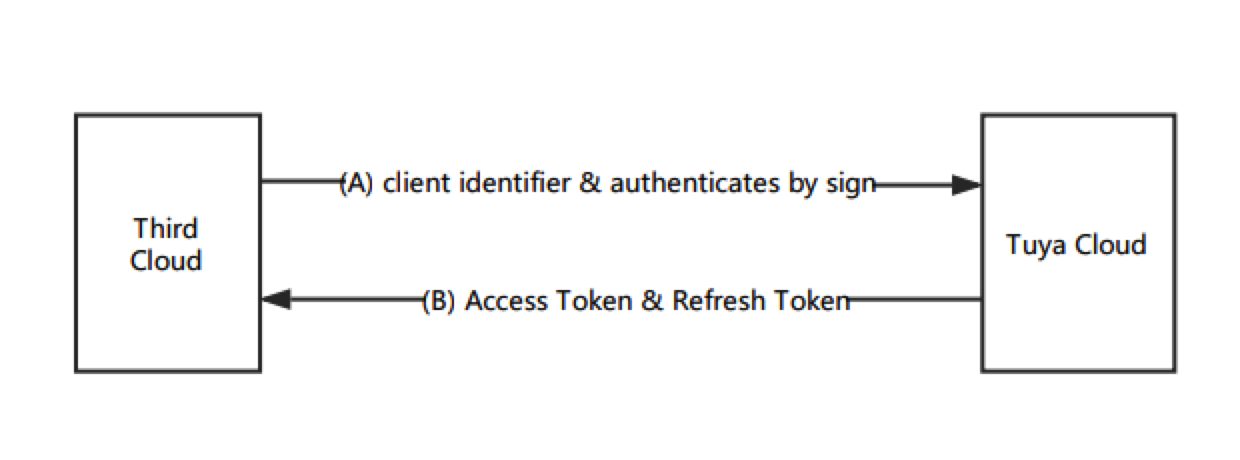
For the cloud integration scenario, Tuya provides an implicit authorization method to obtain:
Notes:The token obtained by the implicit authorization method, the permission dimension is the developer dimension, and the operation permission scope of the token is the scope of the developer’s authorized operation, such as operation (add, delete, modify, get) the developer’s application user data, operation Device data under the developer product, device data bound by the user under the operation developer application.
Environment Description
  China   https://openapi.tuyacn.com
  America https://openapi.tuyaus.com
  Europe  https://openapi.tuyaeu.com
  India   https://openapi.tuyain.com
The user of each interface should call the corresponding interface according to its own located area.
Request Method
Note: When the request method is POST, content_type needs to use application/json.
Request Header Settings
Every interface must add the following parameters in the header:
| Parameter name | Type | Parameter position | Description | Required |
|---|---|---|---|---|
| client_id | String | header | client_id | Yes |
| access_token | String | header | Token obtained through the above authorization | Yes |
| sign | String | header | The signature calculated by the specified signature algorithm: token-related interface, service-related interface | Yes |
| sign_method | String | header | HMAC-SHA256 | Yes |
| t | Long | header | 13-digit standard time stamp | Yes |
| lang | String | header | language,Default zh in China, default en in other areas | No |
business interface(except token interfaces) needs a parameter:access_token
Signature method
TuyaCloud provide two sign algorithm based on different scenario:
token related interface(v1.0/token&v1.0/token/{refresh_token}):sign = HMAC-SHA256(client_id + t, secret).toUpperCase()
business interface(except token interfaces):sign = HMAC-SHA256(client_id + access_token + t, secret).toUpperCase()
Return Results
Unified return to JSON. The general format is as follows:
Normal return of business:
{

    "success": true,
    "result": {
        //object
    }

}
Erroneous return of business:
{

    "success": false,
    "code": 1010,
    "msg": "token illegal"

}
Tuya cloud Use hmac-sha256 to create a summary, according to different application scenarios, currently provides two sets of signature algorithms:
Token management interface(get token, refresh token)
sign = HMAC-SHA256(client_id + t, secret).toUpperCase()
Use the requested client_id and the currently requested 13-digit standard timestamp to stitch into a string to be signed, and use the cloud application secret as the key to participate in the hash digest. The resulting string is finally capitalized.;
Business interface
sign = HMAC-SHA256(client_id + access_token + t, secret).toUpperCase()
Use the applied cloud application client_id + the currently valid request token + the currently requested 13-digit standard timestamp to stitch into the string to be signed, and use the applied cloud application secret as the key to participate in the hash digest, and the resulting string, And finally capitalized。
Signature example
Prepare parameters:
client_id:1KAD46OrT9HafiKdsXeg
secret:4OHBOnWOqaEC1mWXOpVL3yV50s0qGSRC
t:1588925778000
access_token:3f4eda2bdec17232f67c0b188af3eec1
Token management interface signature:
String to be signed:1KAD46OrT9HafiKdsXeg1588925778000
Signature result:HMAC-SHA256(1KAD46OrT9HafiKdsXeg1588925778000,4OHBOnWOqaEC1mWXOpVL3yV50s0qGSRC)
ceaafb5ccdc2f723a9fd3e91d3d2238ee0dd9a6d7c3c365deb50fc2af277aa83
Convert to uppercase:CEAAFB5CCDC2F723A9FD3E91D3D2238EE0DD9A6D7C3C365DEB50FC2AF277AA83
Business interface:
String to be signed:1KAD46OrT9HafiKdsXeg3f4eda2bdec17232f67c0b188af3eec11588925778000
Signature result:HMAC-SHA256(1KAD46OrT9HafiKdsXeg3f4eda2bdec17232f67c0b188af3eec11588925778000,4OHBOnWOqaEC1mWXOpVL3yV50s0qGSRC)
36c30e300f226b68add014dd1ef56a81edb7b7a817840485769b9d6c96d0faa1
Convert to uppercase:36C30E300F226B68ADD014DD1EF56A81EDB7B7A817840485769B9D6C96D0FAA1
Implementation of HMAC SHA256 in various languages:
/**
Run the code online with this jsfiddle. Dependent upon an open-source js library calledhttp://code.google.com/p/crypto-js/.
**/

<script src="http://crypto-js.googlecode.com/svn/tags/3.0.2/build/rollups/hmac-sha256.js"></script>
<script src="http://crypto-js.googlecode.com/svn/tags/3.0.2/build/components/enc-base64-min.js"></script>

<script>
  var hash = CryptoJS.HmacSHA256("Message", "secret");
  var hashInBase64 = hash.toString().toUpperCase();
  document.write(hashInBase64);
</script>
/**
PHP has built-in methods for hash_hmac (PHP 5) and base64_encode (PHP 4, PHP 5) resulting in no outside dependencies. Say what you want about PHP but they have the cleanest code for this example.
**/

$s = hash_hmac('sha256', 'Message', 'secret', true);
echo strtoupper(var_dump(($s));
/**
Dependent on Apache Commons Codec to encode in base64.
**/

import javax.crypto.Mac;
import javax.crypto.spec.SecretKeySpec;
import org.apache.commons.codec.binary.Base64;

public class ApiSecurityExample {
  public static void main(String[] args) {
    try {
     String secret = "secret";
     String message = "Message";

     Mac sha256_HMAC = Mac.getInstance("HmacSHA256");
     SecretKeySpec secret_key = new SecretKeySpec(secret.getBytes(), "HmacSHA256");
     sha256_HMAC.init(secret_key);

     byte[] bytes = sha256_HMAC.doFinal(message.getBytes());
     String hash = new HexBinaryAdapter().marshal(bytes).toUpperCase();
     System.out.println(hash);
    }
    catch (Exception e){
     System.out.println("Error");
    }
   }
}
using System;
using System.Security.Cryptography;

namespace Test {
  public class MyHmac {
    public static string Encrypt(string message, string secret {
                secret = secret ?? "";
                var encoding = new System.Text.UTF8Encoding();
                byte[] keyByte = encoding.GetBytes(secret);
                byte[] messageBytes = encoding.GetBytes(message);
                using (var hmacsha256 = new HMACSHA256(keyByte))
                {
                    byte[] hashmessage = hmacsha256.ComputeHash(messageBytes);
                    StringBuilder builder = new StringBuilder();
                    for (int i = 0; i < hashmessage.Length; i++)
                    {
                        builder.Append(hashmessage[i].ToString("x2"));
                    }
                    return builder.ToString().ToUpper();
                }
            }
  }
}
Accelerate the development of cloud-to-cloud docking. Currently, the Tuya Cloud SDK based on the Java development language is provided to encapsulate token-related, user-related, and device-related interfaces.
Developers only need to pay attention to the invocation of the business function method used and build the corresponding TuyaClient instance. The instance will automatically update the token and complete the corresponding API call. The SDK mainly includes the following functions, please refer to the corresponding modules below for detailed interface information:
Integrated SDK
IDEA import jar package:
Https://jingyan.baidu.com/article/0f5fb0993e9e1f6d8334ead2.html
Eclipse import jar package:
Download link
GitHub link
General Module
Because some of the newly added interfaces cannot be integrated into the SDK in a timely manner, developers can expand horizontally through the SDK’s universal interface to meet development.
Get the header list:
/ **
* Get Header List
* @param isToken is a token related request, generally false
* @return
* /
public List <Header> getHeaders (Boolean isToken)
Universal Tuya interface:
/ **
   * Universal Tuya interface
   * @param url
   * @param method request type (example: GET)
   * @param headers request header content (additional header)
   * @param body
   * @return
   * /
public String commonHttpRequest (String url, HttpMethod method, Map <String, String> headers, Object body)
Call example
registered user
TuyaClient client = new TuyaClient (clientId, secret, RegionEnum.CN);
String uid = client.registerUser ("testApp", "86", "18212345678", MD5Util.getMD5 ("123456") "nickName", UserTypeEnum.MOBLIE);
System.out.println ("User successfully synced:" + uid);
GitHub link