Wi-Fi door lock indicates the smart lock that can achieve networking and control through non keep-alive Wi-Fi modules. The locks using non keep-live Wi-Fi modules are in low-power mode. The modules are usually in the status of power-off and hibernation, and the MCU of the lock is required to wake up the module before transmitting data.
At present, non keep-alive Wi-Fi locks support MCU common protocol connection. The Tuya modules and the MCU of locks communicate through serial port. The MCU reports the device status and connects to Tuya cloud platform through Tuya modules.
The diagram of MCU connection solution is as follows.
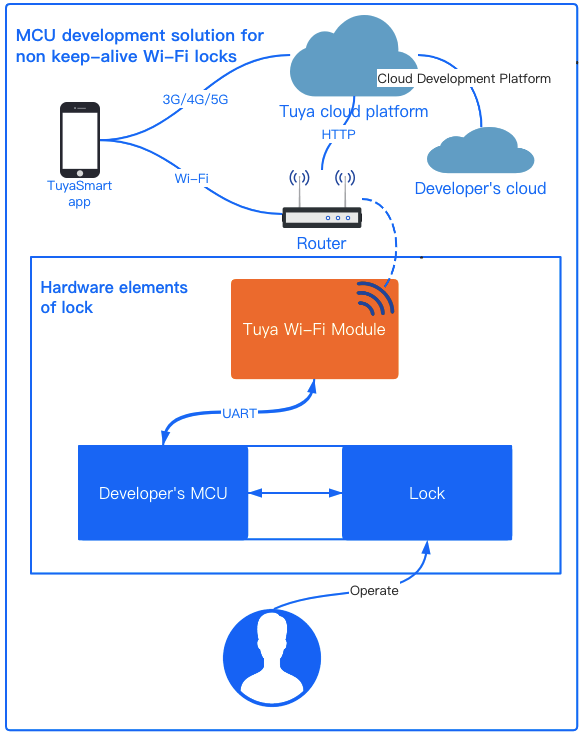
Tuya provides Wi-Fi modules for standard firmware burning purpose of lock, and provides a set of MCU communication protocols. The module connects the Tuya cloud platform, app, and MCU of lock. You need to develop MCU program according to serial port protocols. For rapid development, Tuya also provides MCU SDK, which can be downloaded when you create products on Tuya IoT console, to quickly complete the integration development of serial port protocols.
The public version lock solution uses the Tuya non keep-alive Wi-Fi module for MCU connection, and supports the development of the following features of the lock.
| Feature | Description |
|---|---|
| Full-link communication encryption | The communication among apps, cloud, and Wi-Fi modules are encrypted against security risks. |
| Unlocking history | The method, ID, and time of unlocking operations in the last 12 months are recorded, and users can view them anytime on the app without data loss. And users can set more than one unlocking methods such as fingerprint and password to grant the unlocker. |
| Re-transmit the local unlocking history in case of connection failure | When the connection resumes, the module transmits the unlocking operation history that is only stored locally to the cloud. |
| Alert | The alert of low battery, incorrect password, incorrect fingerprint, incorrect card, prying, and high temperature are supported. |
| Time synchronization | Time of the lock is consistent with the cloud, and users can switch among global time zones and use daylight saving time if needed. |
| Member management | Users can add members and unlocking method ID, and manually associate them on apps. |
| Unlocking operation linkage | The unlocking operations can be automatically linked in scenes on apps. |
| Battery status display | The value and status of battery can be displayed. |
| Other scene linkages | The scene linkage can be established according to the ID or type of the unlocking operation. |
| Remote control on the app | Users can grant or deny an unlocking request that are prompted by apps. |
| Dynamic password | The dynamic password algorithm is integrated into Tuya Wi-Fi modules, and you can implement it in your devices within one hour at the earliest. Also, the algorithm can be fast added on apps. |
| Temporary password management | Users can maintain up to 10 temporary passwords, which can be created and deleted. A newly created temporary password can be automatically copied and pasted to short messages. The SMS can be sent to mobile phone numbers with different country codes. |
| OTA | Both the module and MCU can have OTA upgrade. |
| Hijack alarm | If an unlocking method is marked on the app, the hijacking alarm is triggered when the door is opened by that method. |
| Remote door knocking | The app receives the doorbell call requests that are sent by locks. |
| Local temporary password | The local temporary password is independent of network connection, the password is calculated by modules and the cloud, and the MCU verifies that by calling module interfaces. |
| Lock status display | Users can view the lock status such as locked out, child lock, and others. |
The Tuya Wi-Fi lock integration supports the following categories.
| Category | Description |
|---|---|
| Residential lock basic | Uses the non keep-alive Wi-Fi modules and is applicable to residential door lock integration. |
| Residential lock PRO | Recommended and popular. Uses the non keep-alive Wi-Fi modules and is applicable to residential door lock integration. The PRO reinforces the capability on the basis of basic version by upgrading the UI text, adding the local password function, supporting manually adding unlocking methods on apps, and other features. |
| Safe lock | Applicable to safe lock integration. |
The overall process to create a Wi-Fi lock: Register on the IoT Console - add functions - app panel design - select a module - configure hardware - cloud configuration.
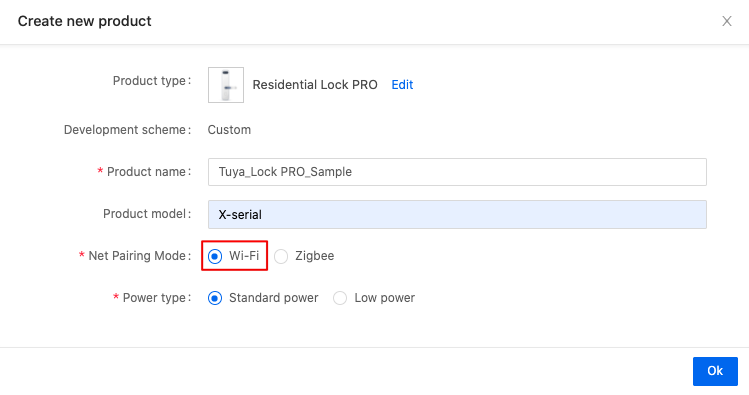
This section takes the creation of Wi-Fi residential lock PRO as an example to describe how to create smart Wi-Fi locks on Tuya IoT console.
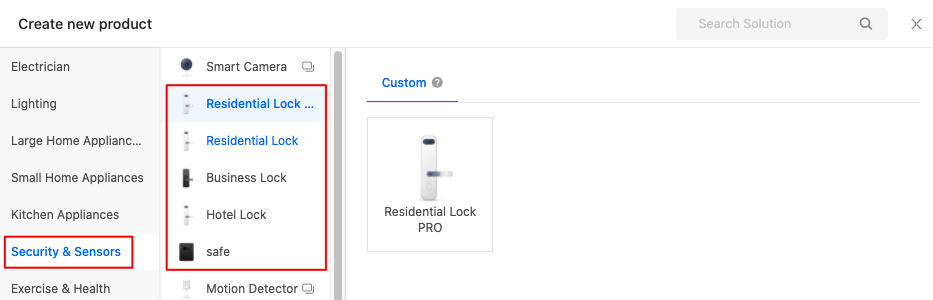
The following figure is shown after you choose the Security & Sensors category.
The following figure is shown after you choose the Residential Lock PRO under the Security & Sensors category on the Tuya IoT console.
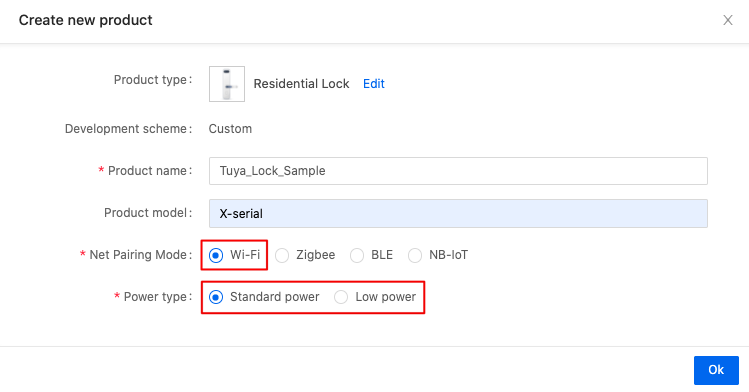
The following figure is shown after you choose the Residential Lock under the Security & Sensors category on the Tuya IoT console.
The following figure is shown after you choose the safe under the Security & Sensors category on the Tuya IoT console.
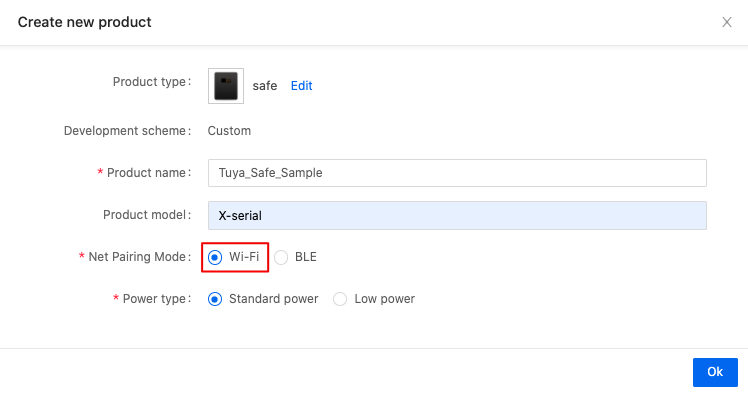
For more information about the DP of residential lock, see DP reference of Wi-Fi residential lock.
For more information about the DP of residential lock, see DP reference of Wi-Fi residential lock PRO.
For more information about the DP of safe lock, see DP reference of Wi-Fi safe lock.
When selecting a module, you can take the power consumption and networking speed of module into account. In addition, whether the module can adapt to the circuit board, whether the pins are enough, whether the external antenna is needed are the considerations.
Now, the recommended module is XR series. The XR series modules upgrade the hardware functions, boost the networking speed, and reduce power consumption. The firmware is also greatly optimized. Simultaneously, it is pin-to-pin compatible with E1S series, so you can migrate to the XR series without hardware consideration. For more information about module selection, see XR1 module specification.
The recommended Wi-Fi modules for Residential lock PRO ,Residential lock and safe lock are as follows.
| Module | Firmware key | Firmware version | Status |
|---|---|---|---|
| XR1 module (Xradiotech) | keyqd85c8xyafrue | The latest version is 1.0.5 | (Recommended) The general firmware has been published. |
| XR1-IPEX module (Xradiotech) | keyqd85c8xyafrue | The latest version is 1.0.5 | (Recommended) The general firmware has been published. |
| XR3 module (Xradiotech) | keyqd85c8xyafrue | The latest version is 1.0.5 | (Recommended) The general firmware has been published. |
The following topics introduce development description, key steps, and key data points (including interaction process, alert/unlock record, process to restore factory defaults, and examples).
For more information, see Function implementation for residential lock.
Public version communication protocol and data protocol during product development. You can download the latest communication protocol when creating a product and selecting a module.
For more information, see Wi-Fi connection protocol for door lock.
Wi-Fi lock development solution use the non keep-alive scheme, which does not support third-party voice control. Wi-Fi lock development solution will support Routines function of Amazon Alexa, but it is still under development. For more information, please contact Tuya account manager.
This following topic lists the frequently-asked questions during Wi-Fi lock R&D and debugging, and provides troubleshooting suggestions.
For more information, see FAQs of Wi-Fi lock.
This topic provides test cases, including software functional test, hardware functional test, and radio frequency test of lock.
For more information, see Test cases for Wi-Fi lock.
For more information, see Production test overview.
Tuya Wi-Fi lock can be controlled and managed through Cloud Development platform.
For more information, see Cloud Development platform API reference for residential lock.