
Zigbee door lock connection is to complete data interaction between the door lock MCU and Zigbee device through the Tuya serial port protocol.
Due to the relatively many functions of door locks, and there are certain differences in the functional points between domestic door lock manufacturers, the functions defined in the Zigbee standard protocol basically cannot meet the requirements, so the private protocol is adopted.
The main function of the Zigbee device is to act as a transmission channel between the MCU and the Zigbee gateway, that is, the data sent by the gateway is encapsulated according to the serial protocol format and sent to the MCU, and the MCU data received from the serial port is encapsulated into the Zigbee ZCL layer. The data format is sent to the Zigbee gateway, and the gateway completes the data interaction with Tuya IoT. A simple understanding is to use the Zigbee network to connect the MCU to Tuya IoT to realize the connection between the door lock and Tuya.
| noun | explanation |
|---|---|
| Zigbee SDK | Tuya Zigbee SDK, which is based on the tailored and optimized package of the Silicon Labs Zigbee protocol stack. |
| Attribute | Attribute is a data value that reflects a physical quantity or state. |
| Cluster | Cluster is a cluster that contains one or more attributes. |
| EndPoint | EndPoint (endpoint) is the entry point of the application layer of the protocol stack, that is, the entry address. It can also understand where the application object exists. It is a group of clusters defined to implement a device description. |
| Device Id | The serial number defined for each device in Zigbee. |
| Weak current device | refers to a battery-powered device, which is called a sleep end device in the Zigbee protocol. |
| High-power equipment | refers to equipment that uses city power or a stabilized power supply from the city power, and is called router in the Zigbee protocol. |
| PID | product ID, each product created on the Tuya IoT platform will generate a unique product number, which is associated with the specific function points of the product, APP control panel, shipping information, and other information related to the product. |
| SOC | system on a chip, the hardware itself has no MCU, and the control program is written into the networking module. |
| SDK | Software Development Kit, a software development kit, a collection of related documents, examples, and tools that assist in the development of a certain type of software. In order to encourage developers to use their system or language, many SDKs are provided for free, as are the graffiti ones. |
| Firmware | Firmware is a program written into EROM (Erasable and Programmable Read-Only Memory) or EEPROM (Electrically Erasable and Programmable Read-Only Memory). Firmware refers to the device “driver” stored inside the device. Through firmware, the operating system can implement the operation of a specific machine in accordance with the standard device driver. For example, CD-ROM drives and burners have internal firmware. Firmware is the software that serves as the most basic and lowest level work of a system. |
| OTA | Over-the-air firmware upgrade, Zigbee module firmware can be upgraded remotely via OTA. |
| MCU OTA | MCU firmware can be upgraded over the air through Zigbee, and the MCU needs to support this function. |
| DP | A set of data formats defined for data interaction with Tuya IoT. Please refer to the table below for specific formats. |
The product is based on the standards-based Zigbee 3.0 protocol
| Profile Id | 0x0104 |
|---|---|
| Device Id | 0x000a |
| endpoint | description |
|---|---|
| 1 | Endpoint for application data interaction |
| SMART_PLUG (0x0051) | Output Clusters (Client) |
|---|---|
| Basic (0x0000) | OTA (0x0019) |
| Time (0x000A) | |
| Private cluster (0XEF00) |
Attributes:
| ID | Name | Data Type | Range | Default |
|---|---|---|---|---|
| 0x0000 | ZCL Version | uint8-0x20 | 0x00-0xff | 0x03 |
| 0x0001 | Application Version | uint8 -0x20 | 0x00-0xff | For example, 0b 01 00 0001 = 1.0.1 means 0x41 is 1.0. 1 The OTA function will use this version number. At the beginning of OTA, the gateway will read the version number of the OTA package and push it to the device. After the OTA restarts successfully, the gateway will read the version number to determine whether the upgrade is successful. Only upgrade to a higher version. |
| 0x0002 | Stack Version | uint8 -0x20 | 0x00-0xff | 0x02 |
| 0x0003 | Hardware Version | uint8 -0x20 | 0x00-0xff | 0x01 |
| 0x0004 | Manufacturer Name | string -0x42 | 0-32 bytes | XXX…XXX (length is 16 bytes, composed of 8 bytes Prefix and 8-byte PID) 0-7 bytes: _TZF320_ 8-16 bytes: PID (created and provided by the product manager on the platform or self-service) |
| 0x0005 | Modle Identifier | string -0x42 | 0-32 bytes | TY0A02 This field is used by the gateway to quickly identify the device type and improve experience |
| 0x0007 | Power Source | enum8-0x30 | 0x00-0xff | depends on your product |
| 0xfffd | Cluster Revision | uint16 -0x21 | 0x0000-0xffff | 0x0001 |
Commands:
| ID | Name | Direction | Description |
|---|---|---|---|
| 0x00 | Reset to factory default | C->S | C: client S:server |
In order to meet the requirements of the general specification, a private cluster is adopted and a private cluster command used to transmit data is defined to realize data interaction. Among them, Destination Endpoint in APS layer: 0x01, ClusterID: 0xEF00, Profile ID: 0x0104, Source Endpoint: 0x01.
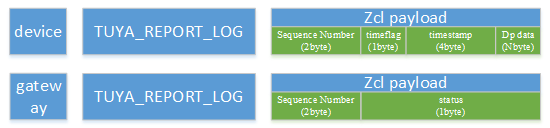
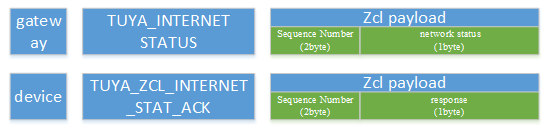
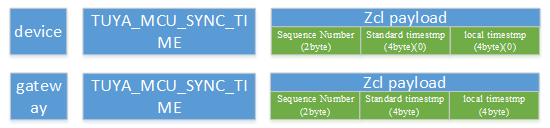
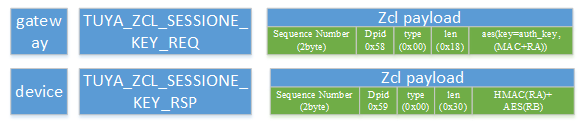
In the zcl layer, the private command id is used to represent different data interaction commands, and the private frame format is defined in the ZCL payload, in the form of sequence number (2byte) + user data.
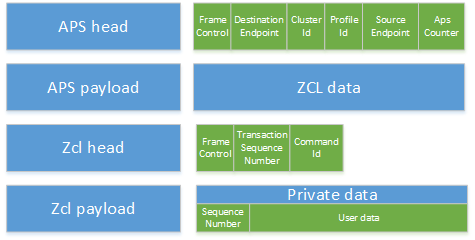
The frame format of Zcl head can refer to in the following table.
| Field | Length (bit) | value | Description |
|---|---|---|---|
| Frame type | 2 | 01 | Command is Specific to a Cluster |
| Manufacture specific | 1 | 0 | Manu Code Not included in zcl |
| Direction | 1 | 0/1 | 0: GW->Zigbee 1: Zigbee->GW |
| Disable default response | 1 | 0/1 | The default is 1, and it is 0 only when the device data is actively reported. At this time, the gateway will actively return a Response message as a sign of successful reporting |
| Reserved | 3 | 000 | Reserved |
| Command Enumeration | Value | Description |
|---|---|---|
| TY_DATA_ REQUEST | 0x00 | Gateway-side data delivery |
| TY_DATA_RESPONE | 0x01 | MCU side response to data request |
| TY_DATA_REPORT | 0x02 | MCU side data actively report |
| TUYA_MCU_VERSION_REQ | 0x10 | Gw->Zigbee gateway query MCU version |
| TUYA_MCU_VERSION_RSP | 0x11 | Zigbee->Gw MCU Return version or actively report version |
| TUYA_MCU_OTA_NOTIFY | 0x12 | Gw->Zigbee gateway notifies MCU to upgrade |
| TUYA_OTA_BLOCK_DATA_REQ | 0x13 | Zigbee->Gw Request MCU upgrade package |
| TUYA_OTA_BLOCK_DATA_RSP | 0x14 | Gw->Zigbee gateway returns the requested upgrade package |
| TUYA_MCU_OTA_RESULT | 0x15 | Zigbee->Gw returns the upgrade result of MCU |
| TUYA_DYNA_PWD_KEY | 0x20 | Dynamic password key (two-way) |
| TUYA_REPORT_LOG | 0x23 | Recorded status report (two-way) |
| TUYA_MCU_SYNC_TIME | 0x24 | Time synchronization (two-way) |
| TUYA_INTERNET STATUS | 0x25 | Gateway network status |
| TUYA_ZCL_INTERNET_STAT_ACK | 0x26 | MCU’s ack to the gateway’s network status (module->gateway) |
| TUYA_ZCL_SESSIONE_KEY_REQ | 0x40 | sessionKey request (Module->Gateway) |
| TUYA_ZCL_SESSIONE_KEY_RSP | 0x41 | Gateway sends cipher text HMA_RA+AES_RB (gateway->module) |
| TUYA_ZCL_SESSIONE_KEY_ACK | 0x42 | Module reply module sends HMAC_RB (two-way) |
| TUYA_ZCL_DYNA_PWD_REQ | 0x43 | Request for dynamic password key (Module->Gateway) |
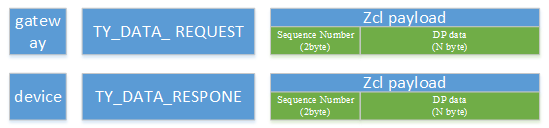
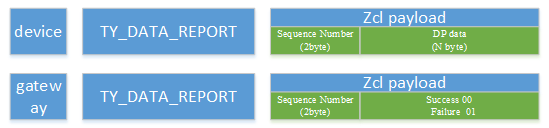






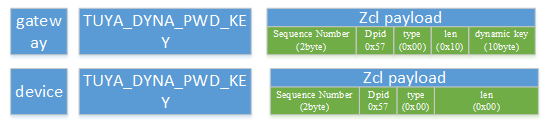
DP data format
| Data segment | Length (byte) | Description | |||
|---|---|---|---|---|---|
| DPID | 1 | Datapoint serial number | |||
| type | corresponding to the specific data type of a datapoint on the Tuya IoT platform, identified by the following "representation value" | ||||
| Type | represents the value | Length (bytes) | Description | ||
| raw | 0x00 | N | corresponds to raw datapoint (module transparent transmission) | ||
| bool | 0x01 | 1 | Value range: 0x00/0x01 | ||
| value | 0x02 | 4 | Corresponding to the int type, big endian means | ||
| string | 0x03 | N | Correspond to a specific string | ||
| enum | 0x04 | 1 | Enumerated type, range 0-255 | ||
| bitmap | 0x05 | 1/2/4 | When the length is greater than 1 byte, big endian means | ||
| len | 2 | The number of bytes corresponding to the length of value | |||
| Value | 1/2/4/N | hex means that big-endian transmission is used for more than 1 byte | |||
Attributes:
| ID | name | Data Type | Range | Default |
|---|---|---|---|---|
| 0x0000 | Upgrade Server ID | EUI64-0xF0 | — | 0xffffffffffffffff |
| 0x0001 | File Offset | uint32-0x23 | — | 0x00000000 |
| 0x0002 | Current File Version | uint32-0x23 | — | 0x00000000 |
| 0x0006 | Image Upgrade Status | enum8-0x30 | — | 0x00 |
| 0x0007 | Manufacturer ID | uint16 -0x21 | — | 0x1002 |
| 0x0008 | Image Type ID | uint16 -0x21 | — | 0x1602 |
| 0x0009 | Min Block Request Period | uint16 -0x21 | — | 0x0000 |
| 0xfffd | Cluster revision | int16-0x29 | 0x0000 -0xffff | 0x0001 |
Commands:
| ID | name | Direction | Description |
|---|---|---|---|
| 0x00 | Image Notify | S->C | |
| 0x01 | Query Next Image Request | C->S | |
| 0x03 | Image Block Request | C->S | |
| 0x06 | Upgrade End Request | C->S |
The UART communication data frame between Tuya Zigbee module and MCU consists of frame header (Front), version (Ver), command word (Cmd), data length (Length), data (Data) and checksum (Check). The definition and description are as follows:
| Octets: 2 | 1 | 2 | 1 | 2 | Variable | 1 |
|---|---|---|---|---|---|---|
| Front | Ver | Seq | Cmd | Length | Data | Check |
Frame format description
| Field | Description |
|---|---|
| Frame header (Front) | 2-byte preamble, fixed as 0x55aa |
| Version (Ver) | Serial communication protocol version, used for upgrade and expansion, the current version is 0x03 |
| Business sequence number (Seq) | Business sequence number (1~0xfff0) |
| Command word (Cmd) | For specific frame types, see the following table |
| Data length (Length) | Effective data length transmitted |
| Data | Effective data transmitted |
| Checksum (Check) | Data check, starting from the frame header by byte summing the result of 256 remainders |
Cmd description table
| CMD id | Description | direction |
|---|---|---|
| 0x00 | Wake up from sleep | (Zigbee<—>MCU) |
| Wake-up response | (MCU<—>Zigbee) | |
| 0x01 | Product information query | (Zigbee—>MCU) |
| Product information response | (MCU—>Zigbee) | |
| 0x02 | Product information query | (Zigbee—>MCU) |
| Zigbee status query response | (Zigbee—>MCU) | |
| 0x03 | Zigbee device reset | (MCU—>Zigbee) |
| Zigbee device reset response | (Zigbee—>MCU) | |
| 0x04 | Data command issuance | (Zigbee—>MCU) |
| Data command issuance response | (MCU—>Zigbee) | |
| 0x05 | Data transaction report | (Zigbee—>MCU) |
| Report the data transaction accordingly | (Zigbee—>MCU) | |
| 0x06 | Zigbee status notification | (Zigbee—>MCU) |
| 0x07 | Request dynamic password | (MCU—>Zigbee) |
| Request for dynamic password response | (Zigbee—>MCU) | |
| 0x08 | MCU offline password report | (Zigbee—>MCU) |
| Offline password response | (MCU—>Zigbee) | |
| 0x09 | Zigbee module function test | (MCU—>Zigbee) |
| Test response | (Zigbee—>MCU) | |
| 0x0a | Zigbee sends MCU version query | (Zigbee—>MCU) |
| MCU response | (MCU—>Zigbee) | |
| 0x0b | OTA upgrade notification | (Zigbee—>MCU) |
| MCU response | (MCU—>Zigbee) | |
| 0x0c | OTA firmware content request | (MCU—>Zigbee) |
| Zigbee response | (Zigbee—>MCU) | |
| 0x0d | Report the result of OTA firmware upgrade | (MCU—>Zigbee) |
| Zigbee response | (Zigbee—>MCU) | |
| 0x23 | Data format of record-type status report (including timestamp) | (MCU—>Zigbee) |
| Response to the data format of the record-type status report | (Zigbee—>MCU) | |
| 0x24 | MCU time synchronization request | (MCU—>Zigbee) |
| Gateway time synchronization request or response | (Zigbee—>MCU) |
For specific serial protocol content, please refer to Universal MCU Docking Protocol.
MCU sends configuration commands to open the module network configuration
Beacon request channel scan interval is greater than 200ms, priority channel scan
Scanning time does not exceed 3 minutes
After the network configuration is successful, the data request time is 250ms, lasts for 1 minute, and then switches to 5s.
After the power is turned off, the network status needs to be resynchronized to the MCU, and the time stamp needs to be requested at the same time, and the requested timestamp is sent to the MCU.
If there is offline data (recorded data uploaded to the module by the MCU when the module is offline), when the module is powered on and rejoined successfully, and it is connected to the server, the saved data will be sent to the gateway one by one.
If the retransmission of the APS layer is enabled, it is recommended to set Disable Default Response to 1 to avoid too many acks.
The Transaction Sequence Number of retransmitted data needs to be consistent
The retransmission interval is greater than 250ms, and the retransmission duration is recommended to be less than 3s
Avoid frequent rejoin
Based on Tuya Zigbee SDK development:
Self-developed-non-Tuya Zigbee module:
Use Tuya full authorization tool to authorize
Authorization for serial communication between the module and the host computer: Refer to Serial Communication Protocol Document
Serial communication example code: Refer to Use Tuya Authorization SDK Authorization
Self-developed-Tuya Zigbee module: