Tutorial for Tuya Support Center
Tutorial for Tuya Support Center
“Service and Support” belongs to Tuya’s intelligent service system, which aims to comprehensively improve service quality and service efficiency. And Technical Ticket serves as a platform communication tool to escort you to use the platform. When you encounter problems at any stage of understanding Tuya, product plan formulation or development, the technical support team will provide you with professional support. At the same time, you can check the problem processing progress in time here to ensure that the problem processing progress can be tracked, and the historical processed problems can be traced back.
1. Preparation before submitting technical ticket
We provide you with documents and frequently asked questions, which usually cover more than 80% of the information you need. Before you submit a technical ticket, please make sure you have checked:
- Document Center (covering help documents from product development to mass production sales, one-stop solution to your various problems)
- Help Center (for product development and daily use, providing more granular point-to-point Q&A)
- Platform announcements(all kinds of important platform announcements)
- Smart Service
2. How to submit a technical ticket
We provide you with a variety of entries for submitting technical tickets, and are equipped with a corresponding technical team for the type of problem you choose. When submitting a technical ticket, please follow the steps below:
2.1 Prepare to ask
Please prepare relevant information before asking questions, such as relevant company information, product ID, device ID, specific scenarios where the problem occurred, etc., so that we can provide you with more accurate answers faster.
2.2 Choose a question entry that suits you, and submit a ticket
-
Intelligent solution (if you use “IoT platform” or “service and support” for the first time, this solution is more suitable)
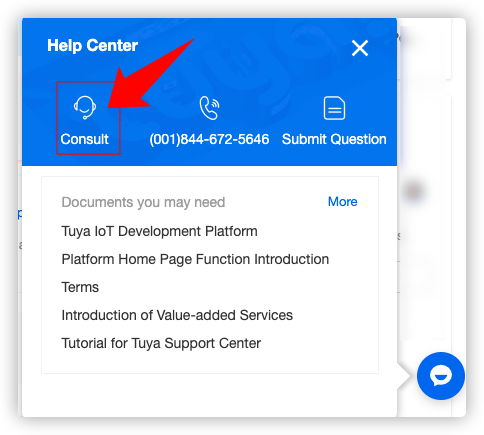
Step 1. Enter “consult” through the button at the bottom right corner of the IoT platform homepage.
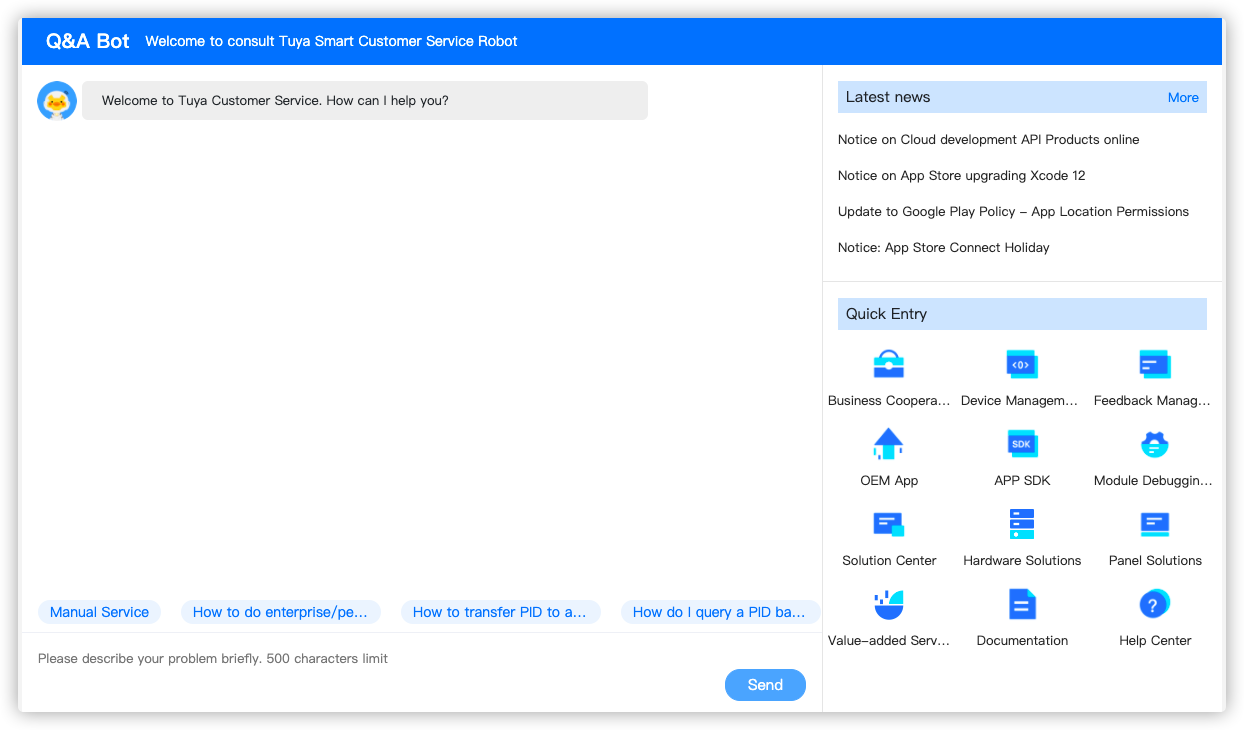
Step 2: Communicate your problem with Tuya Smart Robot and obtain a preliminary solution.
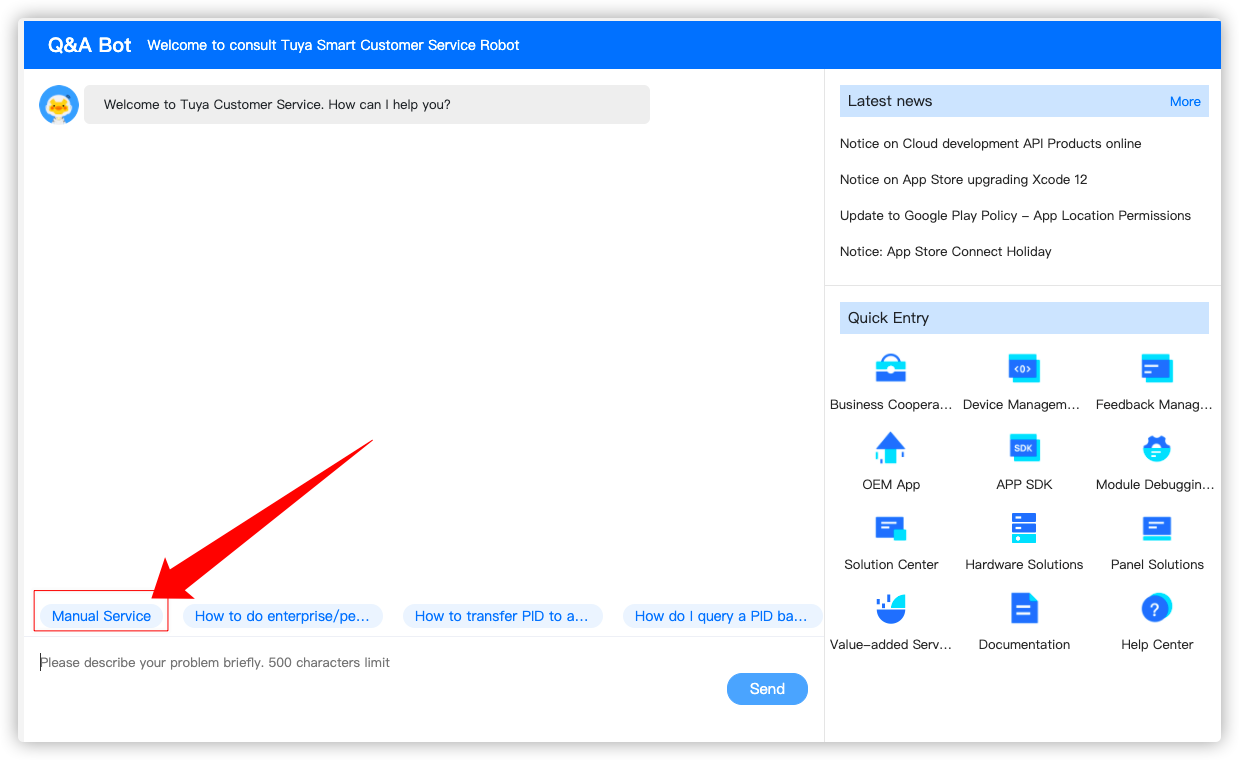
Step 3. If the Tuya Smart Robot cannot solve the problem, click “Manual Service”.
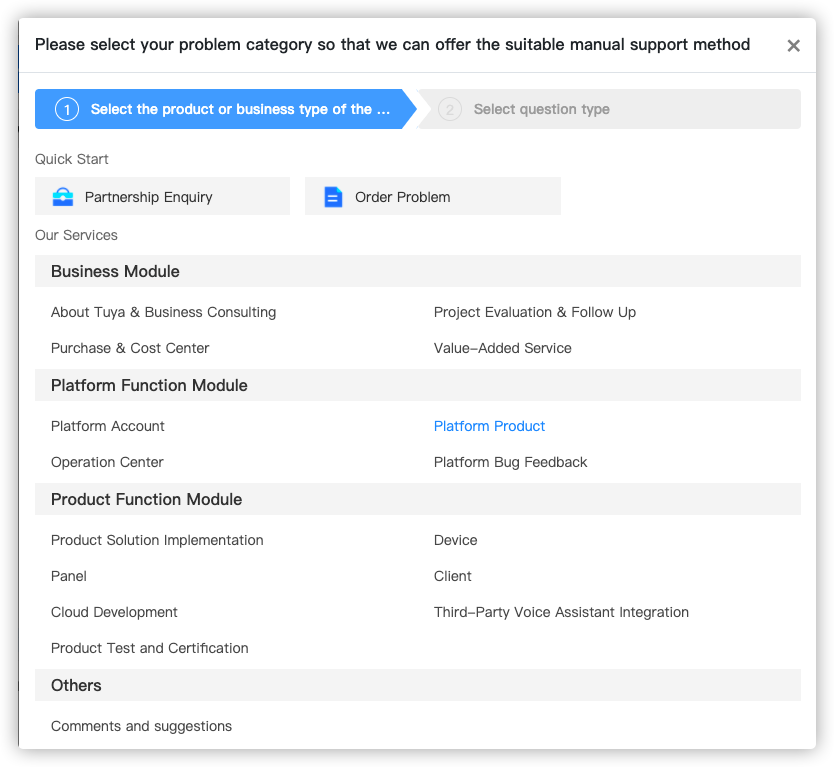
Step 4. Preliminary analysis of your problem, and select the appropriate problem category.
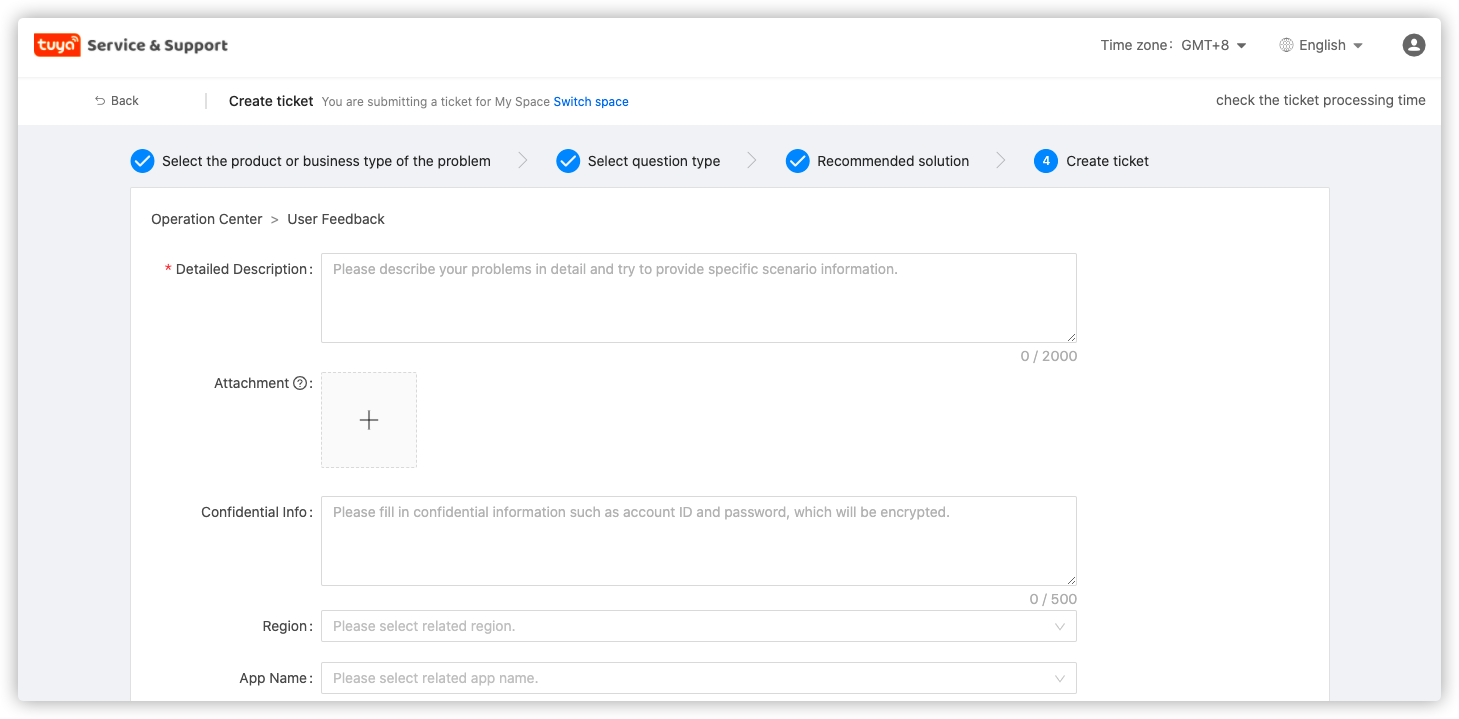
Step 5. Fill in the detailed description, relevant information, contact information, etc. of the problem according to the prompts on the page, and click “Submit the ticket”.
-
Universal solution (if you have used “IoT platform” or “service and support” many times, you can use this solution)
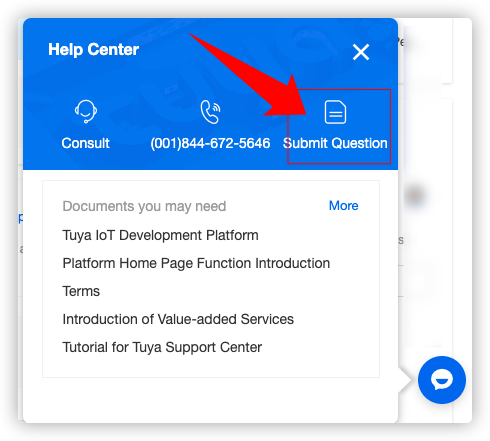
Step 1. Use the button at the bottom right corner of the IoT platform homepage to enter “Submit Question”; or enter the technical support homepage through “Technical Support” at the top of the IoT platform.
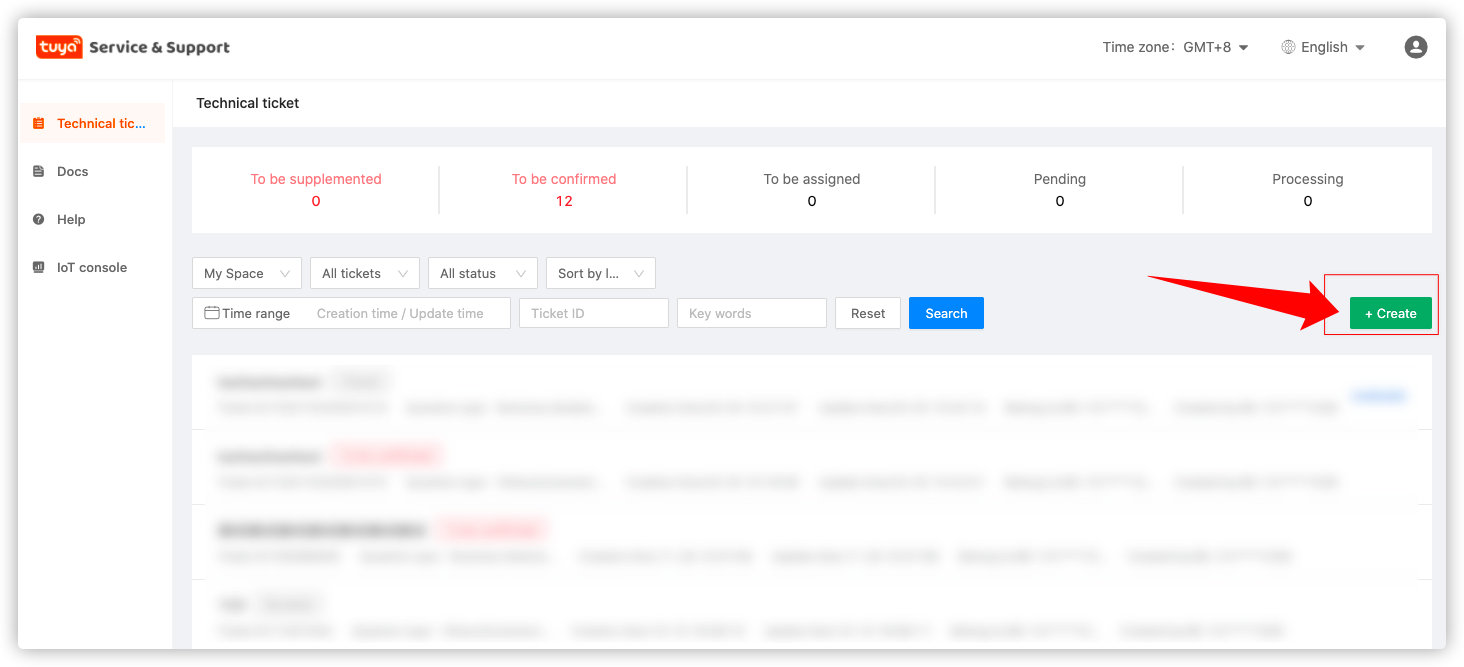
Step 2. Click “+Creat” to enter the problem classification page.
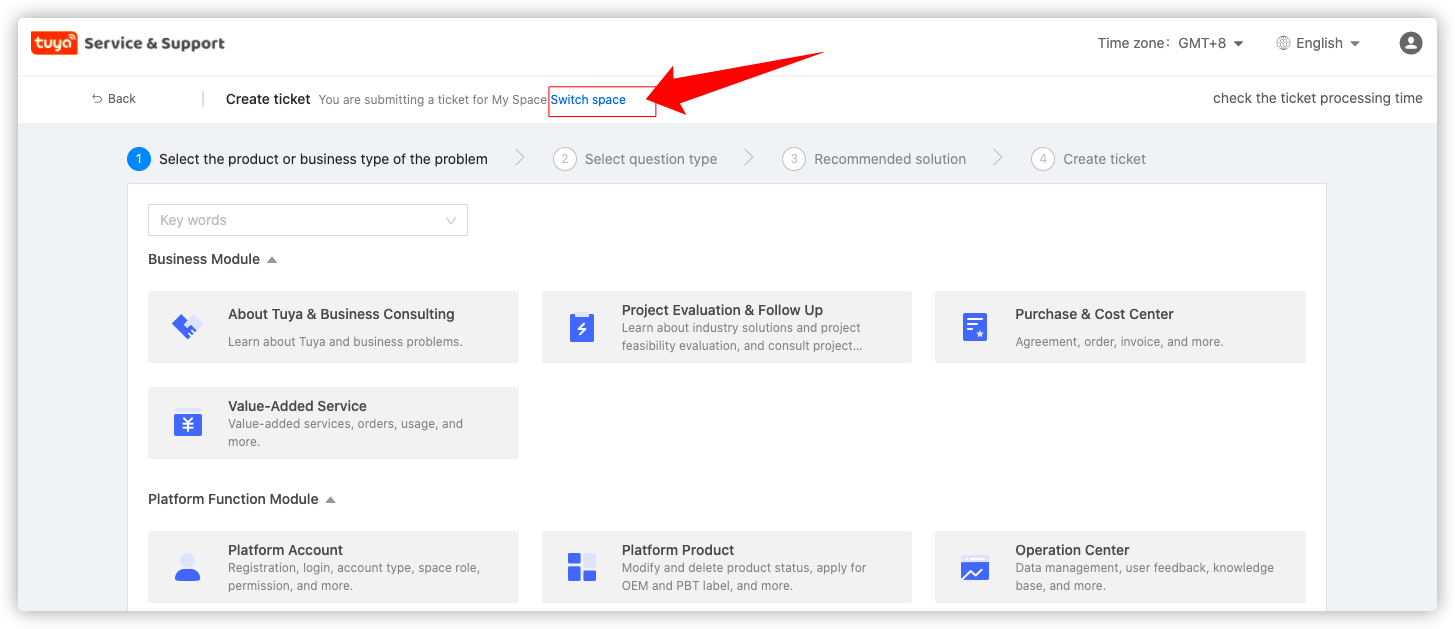
Step 3: Choose the corresponding space for your ticket. Note: Each ticket cannot be displayed in multiple spaces at the same time; once a space is selected and a ticket is submitted, it cannot be changed and the information of other spaces cannot be queried.
Step 4. Preliminary analysis of your problem, and select the appropriate problem category.
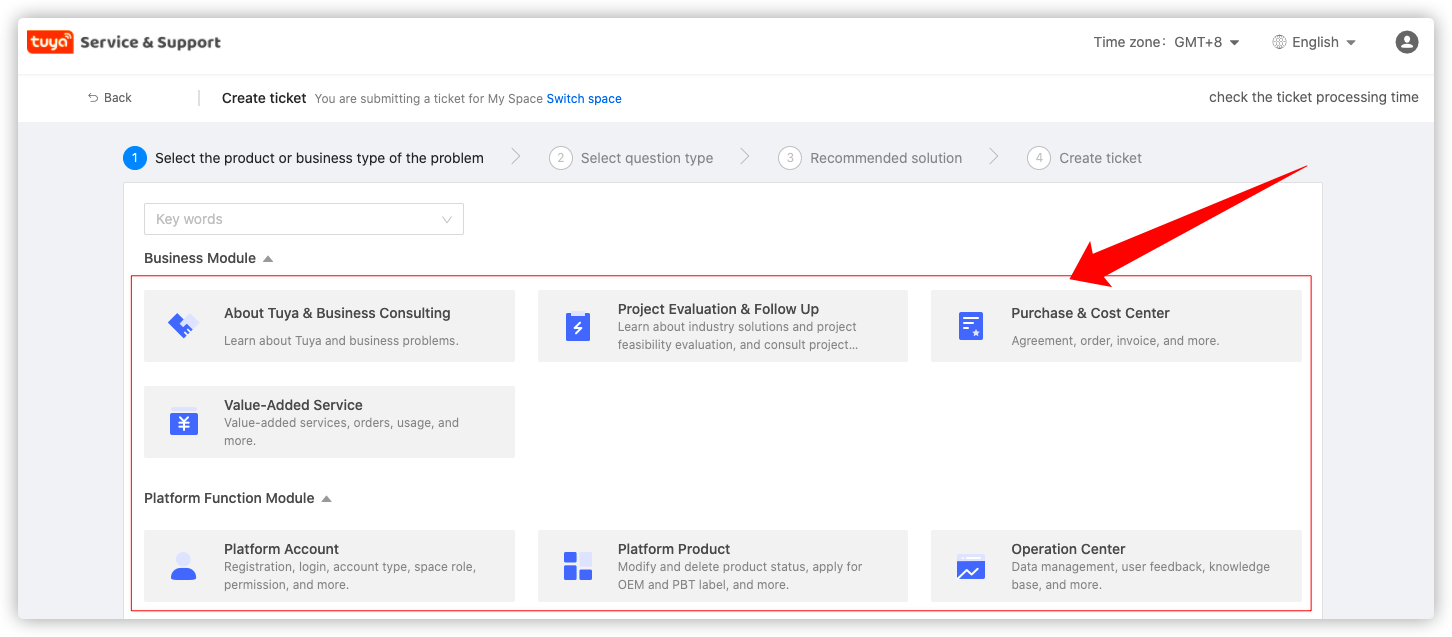
Step 5. Fill in the detailed description, relevant information, contact information, etc. of the problem according to the prompts on the page, and click “Submit”.
3. Receive and manage my technical ticket
3.1 Ticket receipt
On the ticket filling page, we have reserved a “Notification Channel” section for you. When there is a new reply to your ticket, we will synchronize you in time via SMS or email; when necessary, the engineer will also contact you directly according to your reserved phone or email.
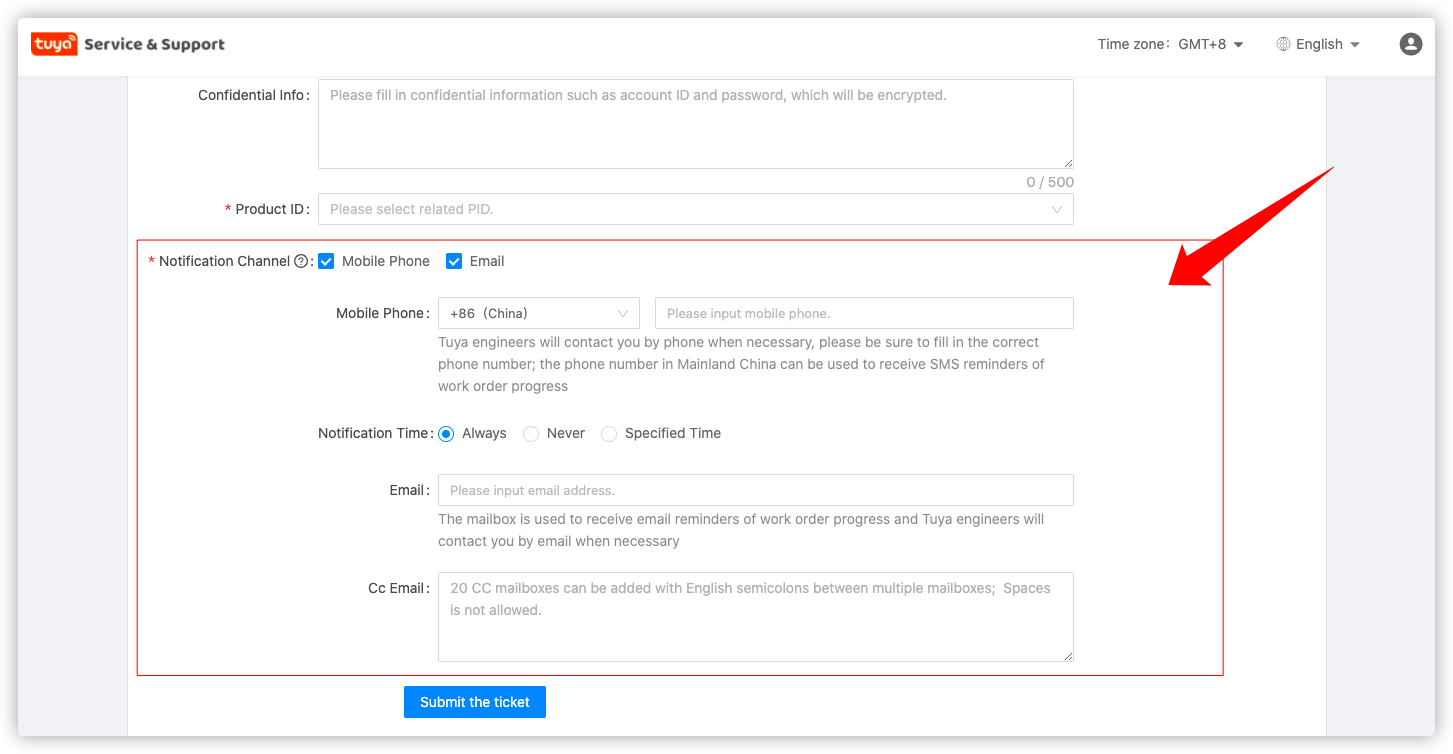
3.2 Ticket Management
On the homepage of “Technical Tickets”, we show you all work tickets that you have permission to. You can filter by “space”, “ticket status”, “time”, “ticket ID”, “keywords”, etc.
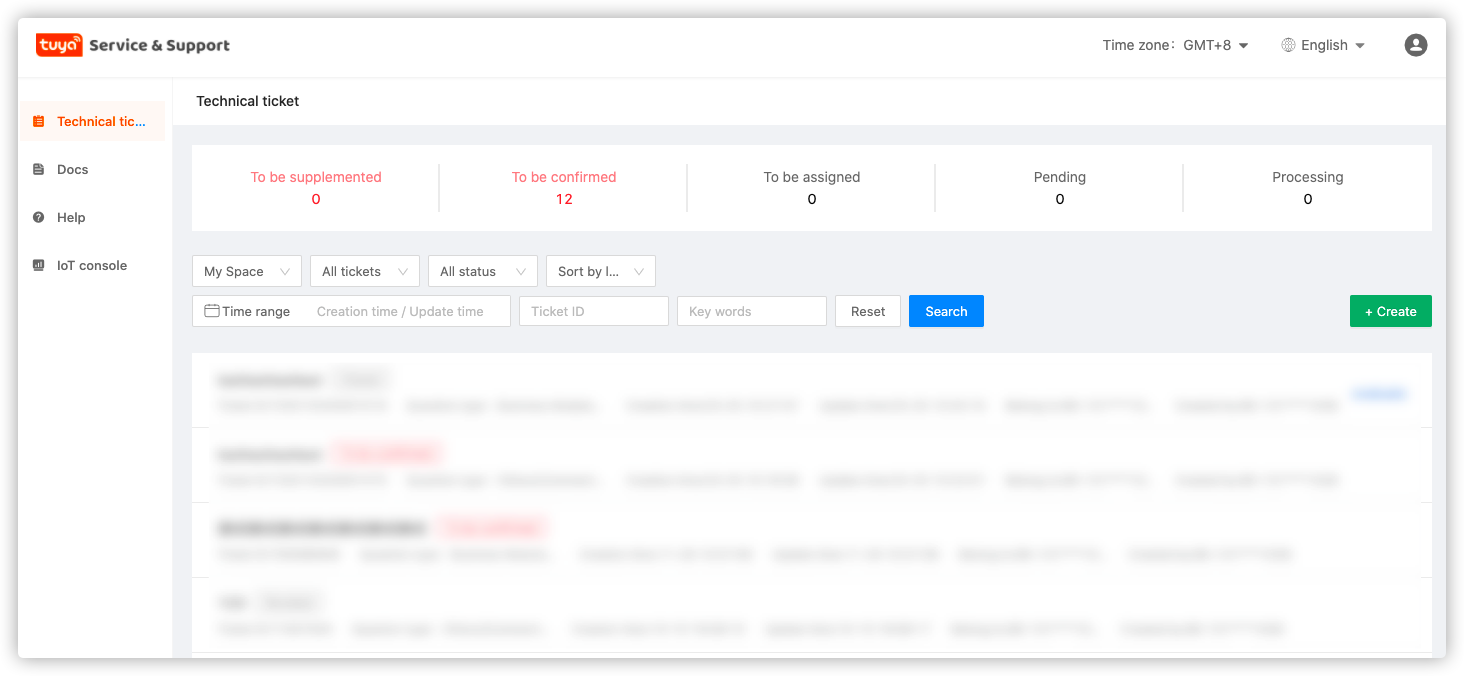
Explanation of ticket status
- To be assigned: The ticket has been successfully created and is waiting for the engineer to receive.
- Pending: The ticket has been assigned to the engineer, waiting for the engineer to process.
- Processing: The engineer is dealing with the problem.
- To be supplemented: The engineer has made a preliminary analysis and still needs more information from you.
- To be confirmed: the engineer has provided a preliminary solution, waiting for your confirmation whether to adopt.
- Revoked: You have cancelled the ticket, and the ticket cannot be reopened.
- Closed: You have confirmed the statement, and the ticket cannot be reopened.
3.3 Ticket follow-up
- After the ticket is submitted successfully, you will enter the ticket interaction page (you can also enter through the home page). At the top of the page is the ticket ID of the ticket, and at the bottom is the interaction details between you and the Tuya engineer, the interface for continuing to ask questions, etc.
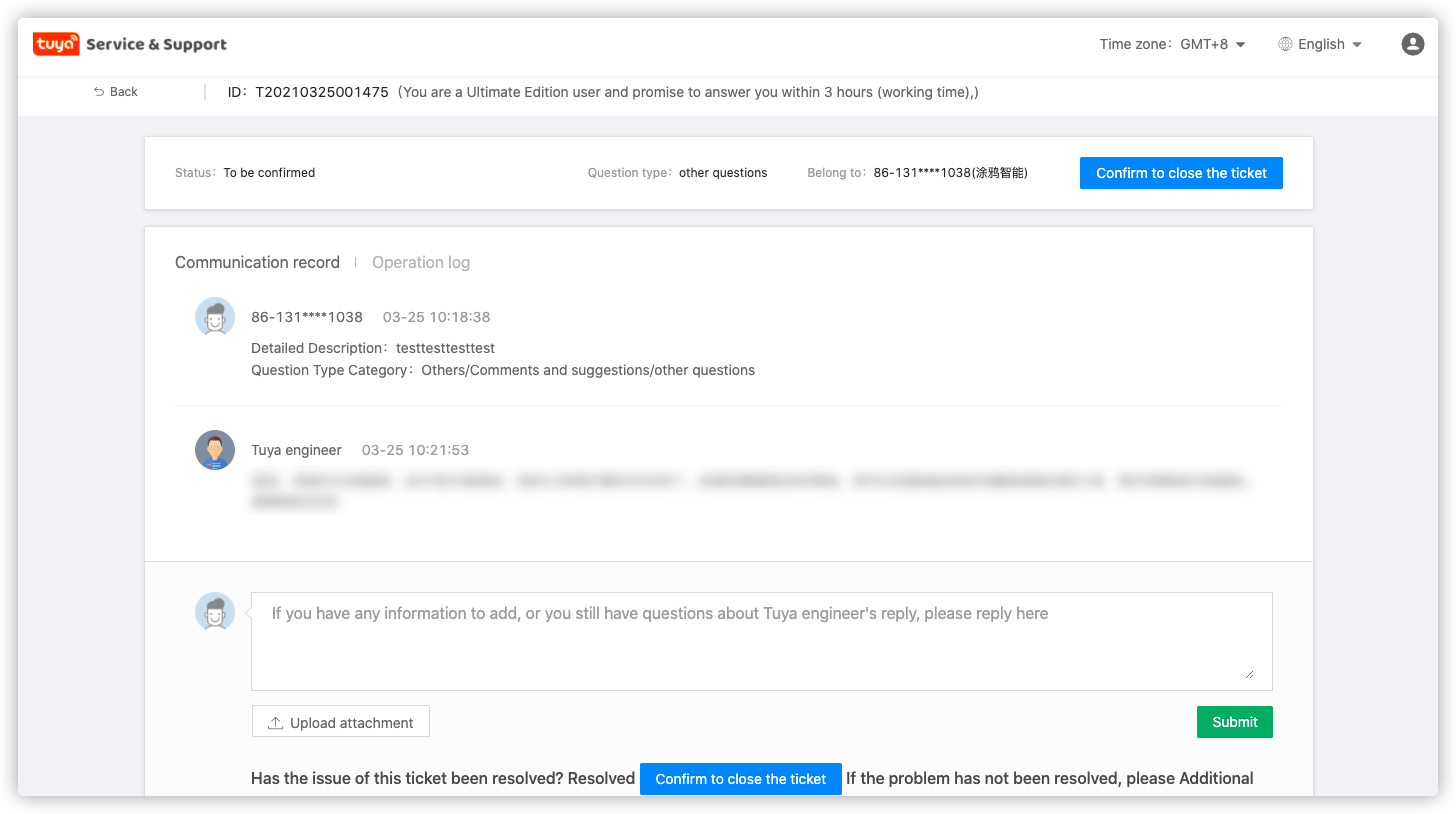
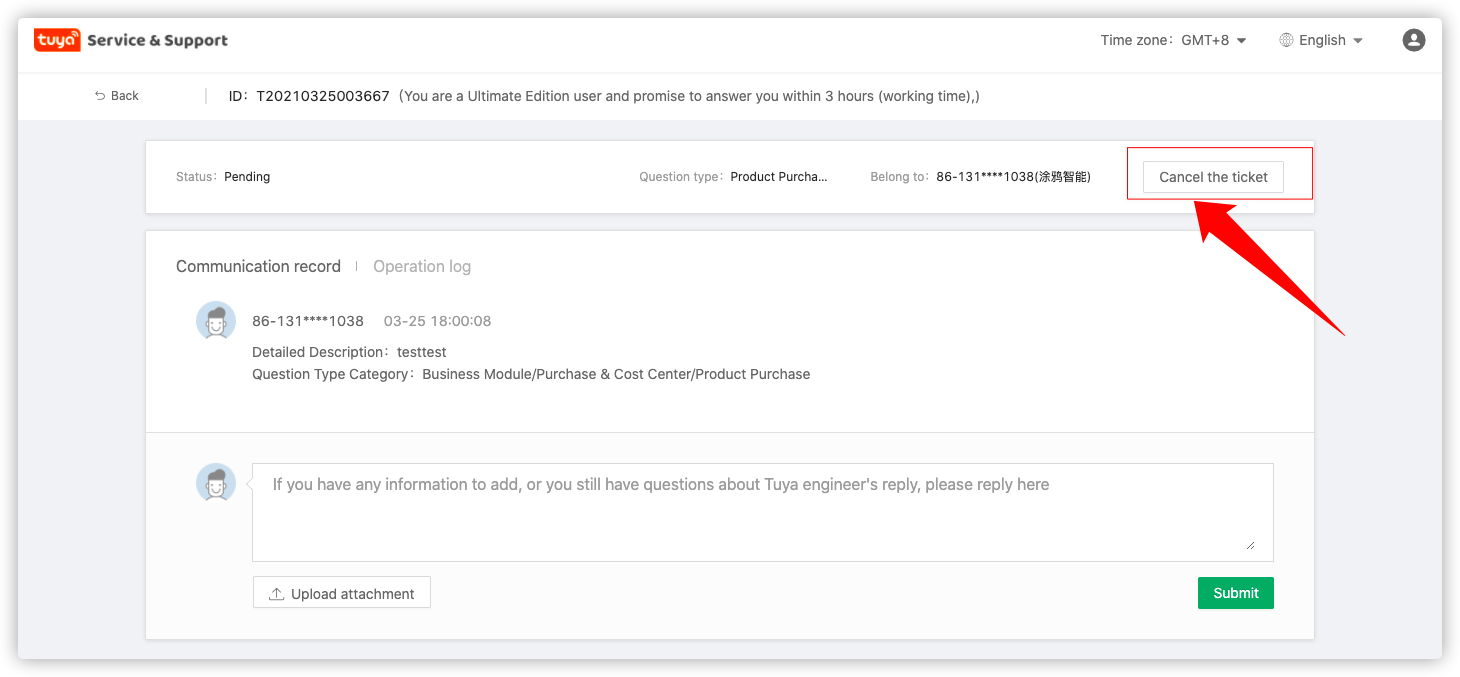
- During the process of ticket interaction, if your problem has been resolved or you will no longer follow up on the problem, you can select the “Cancel the ticekt” button.
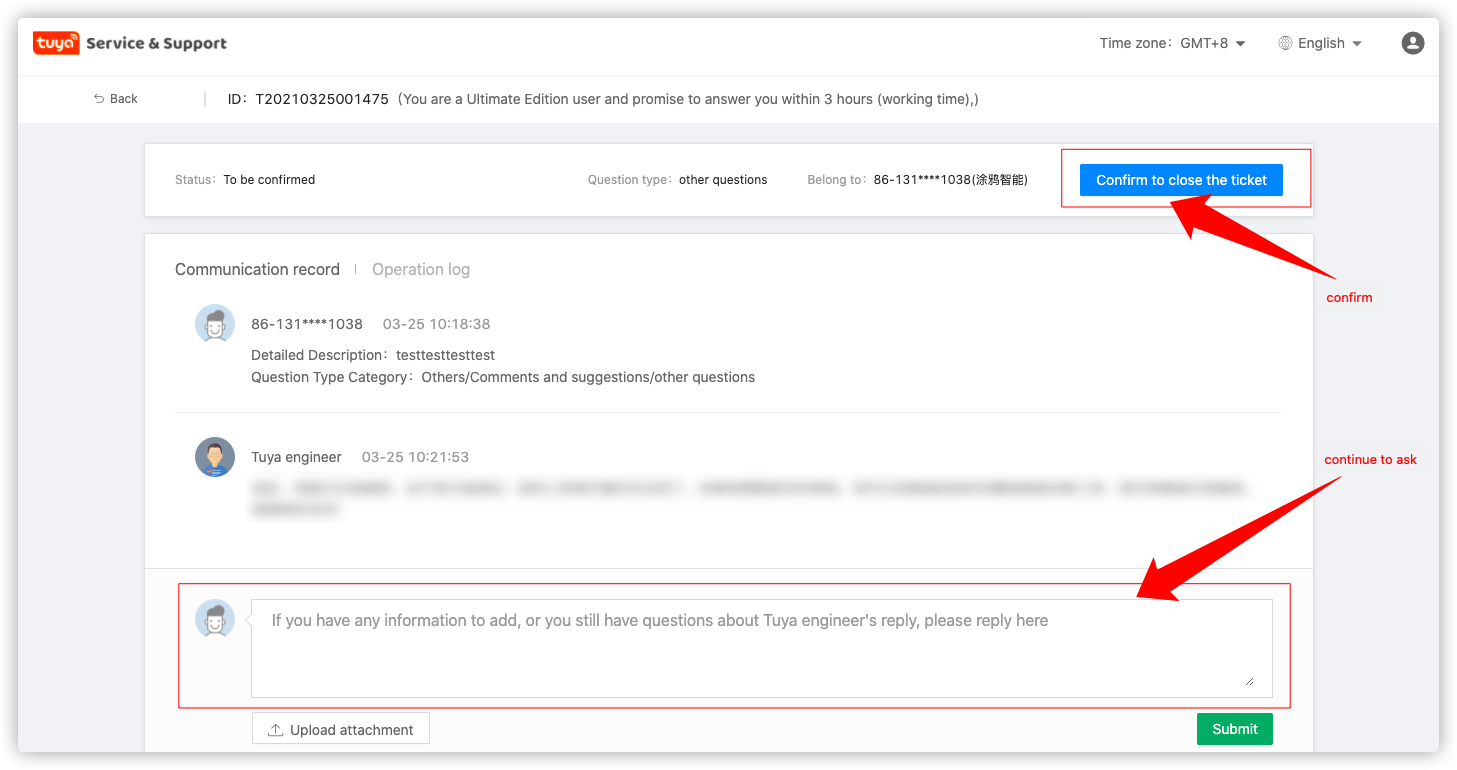
- When the engineer provides the corresponding solution, the status of the work order will change to “to be confirmed”. If you think that the solution cannot solve your problem, you can continue to ask questions in the dialog box; if you think your problem has been solved, or do not continue to follow up the problem, you can click “Confirm to close the ticket” in the upper right corner.
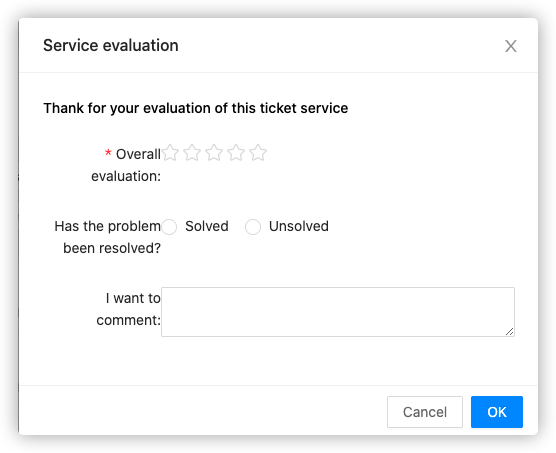
- After clicking “Confirm to close the ticket”, you will enter the evaluation interface. Your evaluation can help us do better~
4. How to expedite my technical ticket
Normally, we will deal with your problem within 1 day. If you can provide relatively specific information (such as videos and pictures showing the problem phenomenon) when you ask questions, or tell us the troubleshooting actions and results you have done before, you can speed up the speed of our problem processing. At the same time, if you are facing a very urgent problem, you can also tell us through the following channels:
- Technical ticket: You can follow up the current ticket with the word “urgent” and the reason; you can also submit a new one with the expedited ticket ID and the reason;
- IoT platform hotline: CN: 400-881-8611 US: (+1)844-672-5646
- IoT platform online: https://tuya01.udesk.cn/im_client/?web_plugin_id=136341
5. What if the solution provided cannot solve my problem
Normally, we will prepare the corresponding solution for you as soon as possible.
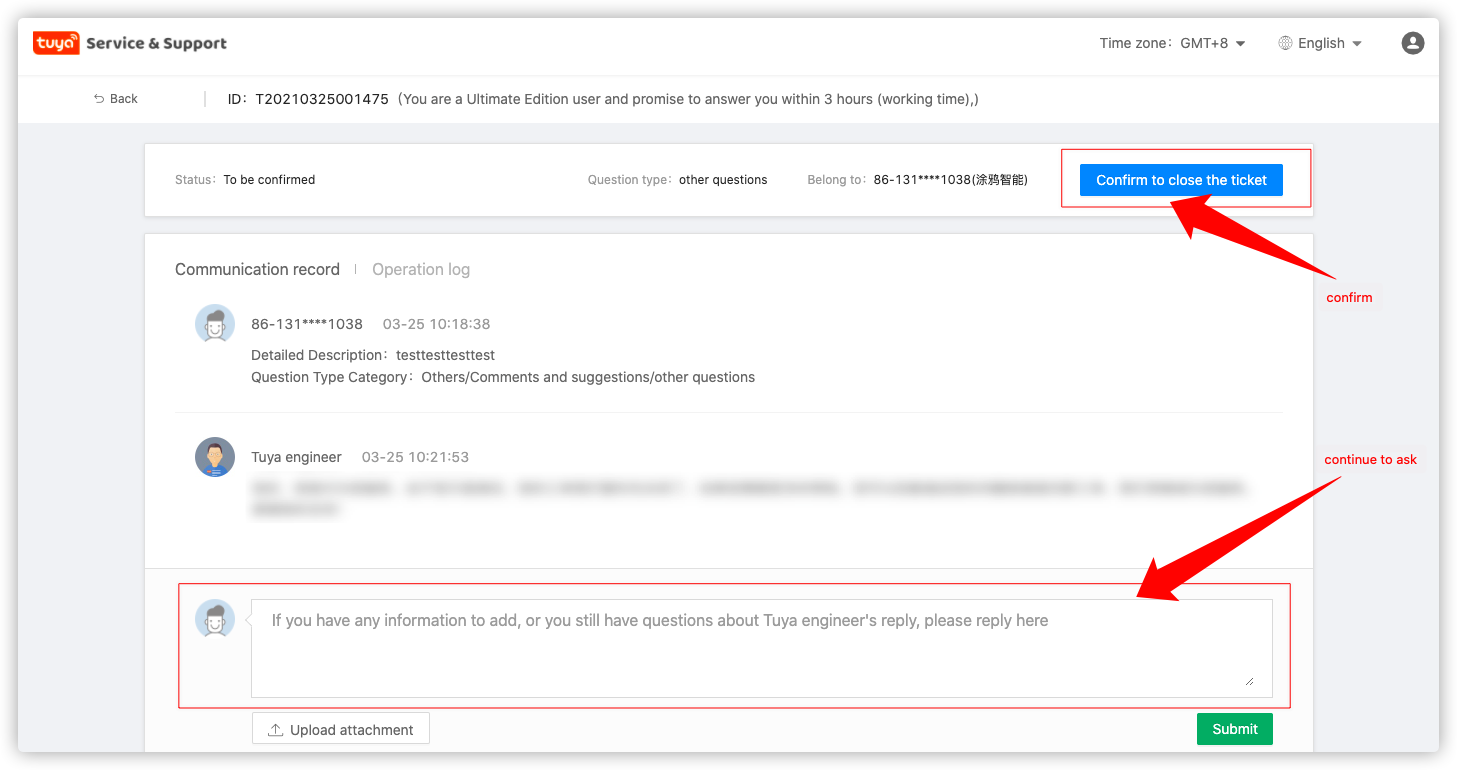
- If you think the engineer’s solution cannot solve your problem, you can continue to ask questions in the dialog box.
- If you are not satisfied with the ticket and do not continue to follow up on the issue, you can click “Confirm to close the ticket” in the upper right corner and tell us your thoughts on the evaluation interface. We will strive to improve our service capabilities and strive to provide you with a better service experience.
6. I’m not a developer, how can I get support for finished products?
We provide you with a dedicated feedback channel for finished products. You can obtain corresponding support through the following channels:
- GO Platform Hotline: Global Service Hotline: 400-867-8671
- GO platform online: https://tuya01.udesk.cn/im_client/?web_plugin_id=136401
- GO platform mailbox: b2b-service@tuya.com
7. How to obtain exclusive technical support plan
We are preparing for this. If you have any thoughts or suggestions on this, you can give us feedback via a technical ticket (other-other-comments and suggestions). If your suggestion is accepted, we will give a small gift to show our gratitude.
May you have a pleasant experience with Tuya Support.